Python Runtime, References, and Mutability: How Objects Really Behave
If you already know Python basics, references and mutability are among the first concepts that start affecting your real project code. Many Python bugs are not caused by missing syntax knowledge. They happen because data changes in a way the developer did not expect.
This guide explains how Python handles objects, references, assignment, mutation, function arguments, shallow copy, deep copy, and mutable default arguments from a practical software development point of view.
Direct answer: In Python, variables are names that reference objects. Assignment does not automatically copy data; it usually creates another reference to the same object. Mutable objects like lists and dictionaries can change in place, while immutable objects like strings and integers do not change in place. This behaviour explains many unexpected data changes in Python projects.


Key Concepts
Before going deeper, these are the concepts that control most reference and mutability behavior in Python.
- Reference: A name pointing to an object in memory.
- Assignment: Binding a name to an object. It does not automatically create a new copy.
- Mutation: Changing an existing object in place.
- Mutable objects: Objects that can change in place, such as lists, dictionaries, and sets.
- Immutable objects: Objects that cannot change in place, such as strings, integers, floats, and tuples.
- Shallow copy: A copy of the outer object where nested objects may still be shared.
- Deep copy: A copy where nested objects are also copied.
- Side effect: A change made by a function outside its direct return value, such as modifying a list passed into it.
Why Runtime Behavior Matters After Python Basics
Knowing Python syntax means you can write loops, functions, lists, dictionaries, and classes. That is important, but it is not enough when your code starts growing into real project logic.
In small scripts, you may not notice how data moves through your program. In larger applications, the same data may pass through API handlers, validation functions, service-layer methods, background jobs, report generators, and database update logic.
At that stage, you need to know whether your function is creating new data or modifying existing data.
Many Python runtime bugs are not caused by wrong syntax. They happen because the developer misunderstands how names, objects, references, and mutation work together.
For example, a student may write a function to clean an API payload before saving it. Later, they realize the original payload used for logging or validation has also changed. The code did not crash, but the project data became unreliable.
That is why Python runtime behavior matters after basics. You are no longer just writing code that executes. You are writing code that must behave predictably.
- Code can run without syntax errors but still produce wrong data.
- Larger projects pass data through many functions, layers, and workflows.
- Some functions create new data, while others modify existing data.
- Runtime behavior affects debugging, reliability, and long-term project quality.
Python Names, Objects, and References
The core idea is simple but powerful: Python variables are names that reference objects.
A variable name does not directly “own” the data in the way many beginners imagine. Instead, the name points to an object in memory. More than one name can point to the same object.
students = ["Aman", "Neha", "Riya"]class_list = studentsclass_list.append("Karan")print(students)print(class_list)Output:
['Aman', 'Neha', 'Riya', 'Karan']['Aman', 'Neha', 'Riya', 'Karan']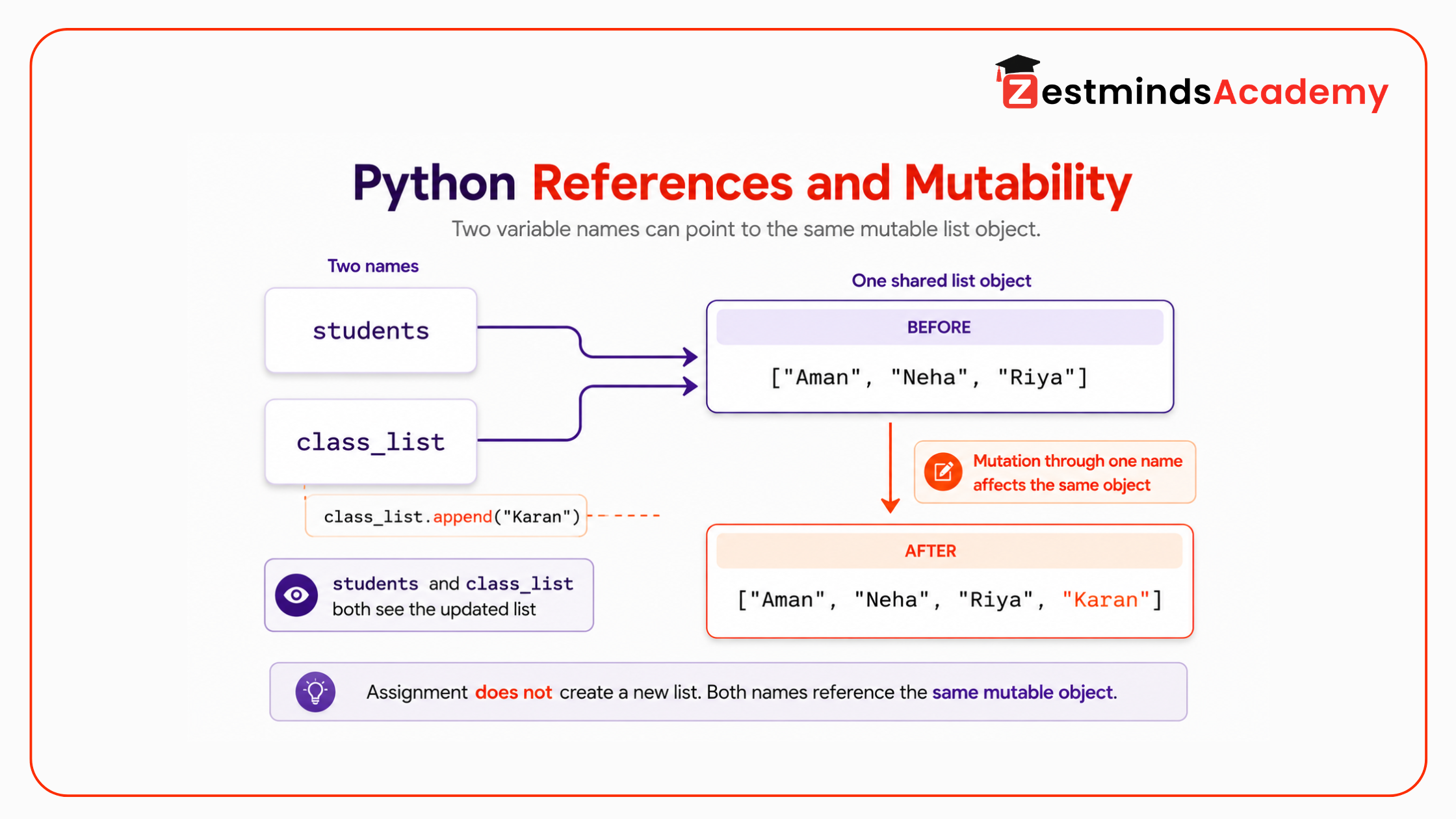
A student may assume that class_list = students creates a new list. Python does not do that. It creates another name pointing to the same list object.
So when class_list.append("Karan") mutates the list, the change is visible through both names because both names reference the same object.
This is the foundation of Python references. Once you understand this, assignment behavior, function side effects, shallow copy, deep copy, and mutable default arguments become easier to reason about.
Assignment Is Not Copying
Assignment gives a name to an object. It does not automatically create a new independent object.
This matters heavily in real project code because lists and dictionaries are commonly passed around between functions.
original_permissions = { "user": "student_101", "roles": ["viewer"]}updated_permissions = original_permissionsupdated_permissions["roles"].append("editor")print(original_permissions)print(updated_permissions)Output:
{'user': 'student_101', 'roles': ['viewer', 'editor']}{'user': 'student_101', 'roles': ['viewer', 'editor']}The common assumption is that updated_permissions is a separate dictionary. Python actually creates a second reference to the same dictionary object.
Because the dictionary is mutable, changing it through one name changes the same object that the other name points to.
In backend code, this can create bugs such as:
- original request data changing before logging
- permission data being modified before validation
- report configuration changing across multiple reports
- shared dictionaries behaving differently between function calls
When you want a separate object, you must copy intentionally. Assignment alone is not copying.
Reassignment vs Mutation
Python developers must clearly understand the difference between reassignment and mutation.
Reassignment means a name starts pointing to a different object.
Mutation means the object itself is changed.
Reassignment Example
status = "pending"same_status = statussame_status = "approved"print(status)print(same_status)Output:
pendingapprovedHere, same_status = "approved" does not change the original string object. It simply makes the name same_status point to a new string object.
Strings are immutable, so their existing content is not changed in place.
Mutation Example with a List
tasks = ["validate_payload", "save_record"]pipeline = taskspipeline.append("send_notification")print(tasks)print(pipeline)Output:
['validate_payload', 'save_record', 'send_notification']['validate_payload', 'save_record', 'send_notification']Here, append() mutates the list object. Since both names reference the same list, both names show the updated list.
Mutation Example with a Dictionary
report = { "title": "Monthly Progress", "status": "draft"}current_report = reportcurrent_report["status"] = "final"print(report)Output:
{'title': 'Monthly Progress', 'status': 'final'}The dictionary object itself changed. This is mutation.
This distinction matters in service-layer functions, API handlers, report generation, and backend data processing. If a function reassigns a local name, the caller’s object may remain unchanged. If a function mutates the object, the caller’s data can change too.
Mutable and Immutable Objects in Python
Python objects can be broadly understood through mutable and immutable behavior.
Mutable objects can be changed after creation.
- lists
- dictionaries
- sets
Immutable objects cannot be changed in place after creation.
- strings
- integers
- floats
- tuples
This does not mean immutable names can never point to different values. Reassignment is still possible.
score = 80score = 90print(score)The integer object 80 was not changed into 90. The name score was rebound to a different integer object.
Tuples need special attention. A tuple is immutable as a container, but it can contain mutable objects.
student_data = ("Aman", ["Python", "Django"])student_data[1].append("FastAPI")print(student_data)Output:
('Aman', ['Python', 'Django', 'FastAPI'])The tuple itself was not changed. Its first and second positions still point to the same objects. But the list inside the tuple was mutated.
Python Reference Behavior Comparison
| Concept | What It Means in Python | Common Student Confusion |
|---|---|---|
| Assignment | Binds a name to an object | Students assume it creates a new independent copy |
| Reference | A name points to an object in memory | Students think every variable has its own separate data |
| Mutation | Changes an existing object in place | Students expect only one variable name to show the change |
| Reassignment | Makes a name point to another object | Students confuse reassignment with mutation |
| Shallow Copy | Copies only the outer object | Nested lists or dictionaries may still be shared |
| Deep Copy | Copies both outer and nested objects | Students use it without understanding when it is actually needed |
This is why mature Python development is not about memorizing which data type is mutable. It is about understanding what object is being changed and who else may be referencing that object.
Function Arguments and Shared References
When you pass data into a Python function, the function receives a reference to the object. If the object is mutable and the function changes it in place, the caller can see that change.
Here is a function that modifies the original dictionary directly:
def clean_student_record(record): record["name"] = record["name"].strip().title() record["email"] = record["email"].strip().lower() return recordstudent = { "name": " aman sharma ", "email": " AMAN@EXAMPLE.COM "}cleaned_student = clean_student_record(student)print(student)print(cleaned_student)Output:
{'name': 'Aman Sharma', 'email': 'aman@example.com'}{'name': 'Aman Sharma', 'email': 'aman@example.com'}This code works, but it modifies the original student dictionary. That is not always wrong. In-place mutation can be acceptable when the function is clearly designed to update the original object.
The danger starts when mutation is hidden and the caller expects the original data to remain unchanged.
A safer version can create a new dictionary:
def clean_student_record(record): cleaned = record.copy() cleaned["name"] = cleaned["name"].strip().title() cleaned["email"] = cleaned["email"].strip().lower() return cleanedstudent = { "name": " aman sharma ", "email": " AMAN@EXAMPLE.COM "}cleaned_student = clean_student_record(student)print(student)print(cleaned_student)Output:
{'name': ' aman sharma ', 'email': ' AMAN@EXAMPLE.COM '}{'name': 'Aman Sharma', 'email': 'aman@example.com'}Now the function returns processed data without changing the original dictionary.
In real backend APIs, this kind of decision matters. Sometimes you want to preserve the raw request payload for logging, validation, debugging, or audit trails. If your cleanup function modifies it directly, you may lose the original data.
Side Effects in Python Functions
A side effect happens when a function changes something outside its direct return value. Mutating a list or dictionary passed into a function is one common side effect.
Side effects are not always bad. For example, a function may intentionally update a cache, append to a result list, write to a file, or update a database record.
The problem is accidental side effects.
def prepare_report(report_data): report_data["status"] = "ready" report_data["generated_by"] = "system" return report_database_report = { "title": "Student Performance Report", "status": "draft"}final_report = prepare_report(base_report)print(base_report)Output:
{'title': 'Student Performance Report', 'status': 'ready', 'generated_by': 'system'}The function name prepare_report does not clearly tell the caller that it will modify the original dictionary. That makes the service logic harder to trust.
A more predictable approach is to return a new object:
def prepare_report(report_data): prepared_report = report_data.copy() prepared_report["status"] = "ready" prepared_report["generated_by"] = "system" return prepared_reportbase_report = { "title": "Student Performance Report", "status": "draft"}final_report = prepare_report(base_report)print(base_report)print(final_report)Output:
{'title': 'Student Performance Report', 'status': 'draft'}{'title': 'Student Performance Report', 'status': 'ready', 'generated_by': 'system'}Service-layer functions should be predictable. If a function mutates input data, that behavior should be intentional and clear from the function name, documentation, or surrounding code.
- Is the mutation intentional?
- Does the function name make the mutation clear?
- Does the caller expect the original data to remain unchanged?
- Should the function return new data instead?
- Will logging, validation, or audit data be affected?
Is Python Pass-by-Reference or Pass-by-Value?
This is one of the most common questions students ask when they start working with Python functions.
Python is not best understood as pure pass-by-reference or pure pass-by-value. A more accurate way to understand it is this: Python passes object references. Many developers also describe this behavior as call by object reference or call by sharing.
When you pass a list or dictionary into a function, the function receives a reference to the same object. If the function mutates that object, the caller can see the change. But if the function reassigns the parameter name to a new object, only the local name inside the function changes.
def update_marks(marks): marks.append(95)scores = [80, 88]update_marks(scores)print(scores)Output:
[80, 88, 95]Here, the function mutates the same list object. That is why the original scores list changes.
Now compare it with reassignment:
def replace_marks(marks): marks = [95, 98]scores = [80, 88]replace_marks(scores)print(scores)Output:
[80, 88]In this case, marks is reassigned inside the function. The local name now points to a new list, but the original scores list outside the function is unchanged.
This difference matters in backend APIs, report generation, automation scripts, and AI workflows because a function may accidentally change shared data without making that change obvious.
Shallow Copy vs Deep Copy
Copying becomes more interesting when data is nested.
A shallow copy creates a new outer object, but nested objects may still be shared.
A deep copy creates a new outer object and recursively copies nested objects too.
student = { "name": "Neha", "marks": { "python": 85, "database": 78 }}student_copy = student.copy()student_copy["name"] = "Neha Sharma"student_copy["marks"]["python"] = 92print(student)print(student_copy)Output:
{'name': 'Neha', 'marks': {'python': 92, 'database': 78}}{'name': 'Neha Sharma', 'marks': {'python': 92, 'database': 78}}The outer dictionary was copied, so changing student_copy["name"] did not affect student["name"].
But the nested marks dictionary is still shared. That is why changing student_copy["marks"]["python"] also changed the original student data.
To copy nested data safely, use copy.deepcopy().
import copystudent = { "name": "Neha", "marks": { "python": 85, "database": 78 }}student_copy = copy.deepcopy(student)student_copy["name"] = "Neha Sharma"student_copy["marks"]["python"] = 92print(student)print(student_copy)Output:
{'name': 'Neha', 'marks': {'python': 85, 'database': 78}}{'name': 'Neha Sharma', 'marks': {'python': 92, 'database': 78}}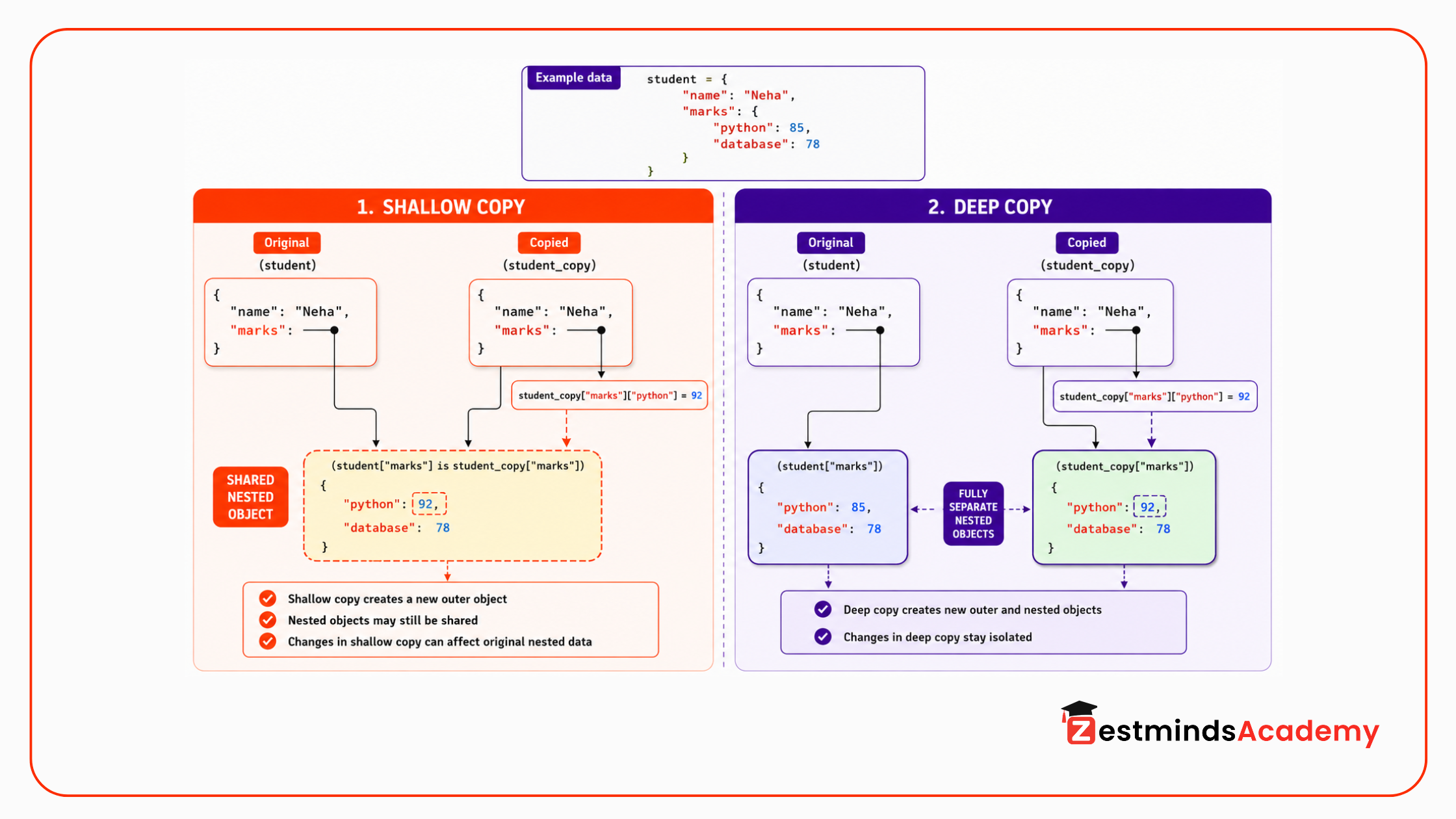
Now the nested dictionary is also independent.
This matters in API payloads, report data, chatbot payload processing, and configuration dictionaries. Many real project structures are nested. A shallow copy may look safe, but nested data can still be shared.
At the same time, copying everything blindly is not always the best solution. Deep copy can be more expensive, especially with large data structures. A good developer understands what needs protection and copies only when needed.
Mutable Default Arguments
Mutable default arguments are one of the most common Python traps after basics.
def add_student(name, students=[]): students.append(name) return studentsprint(add_student("Aman"))print(add_student("Neha"))print(add_student("Riya"))Output:
['Aman']['Aman', 'Neha']['Aman', 'Neha', 'Riya']Many students expect each function call to start with a fresh empty list. That is not what happens.
The default list is created once when the function is defined, not every time the function is called. The same list object is reused across calls.
The safer pattern is to use None as the default and create a new list inside the function.
def add_student(name, students=None): if students is None: students = [] students.append(name) return studentsprint(add_student("Aman"))print(add_student("Neha"))print(add_student("Riya"))Output:
['Aman']['Neha']['Riya']- Do not use lists or dictionaries as default argument values.
- Use None as the default when a new object should be created per call.
- Create the new list or dictionary inside the function.
- Be extra careful in request handling, sessions, background jobs, and report logic.
This bug is dangerous because the function may behave correctly in the first call and fail logically later. In real projects, this can affect request processing, report generation, task queues, user sessions, cached results, and background worker logic.
Where Mutability Bugs Appear in Real Python Projects
Python mutability issues become serious when code moves beyond isolated examples and starts handling project data.
These bugs commonly appear in:
- API request payload mutation: a cleanup function changes the original request data before validation or logging.
- Shared configuration dictionaries: one function modifies configuration and affects other modules using the same object.
- Cached data: cached results are returned directly and later modified by another part of the application.
- Report generation: a base report template is reused but accidentally mutated between reports.
- Automation scripts: shared lists or dictionaries are updated across tasks without clear ownership.
- Background workers: job payloads are modified in one processing step and affect later steps unexpectedly.
- AI and chatbot payload processing: conversation context, metadata, or retrieval results are changed before final response generation.
- Database update preparation: input data is transformed directly before audit, rollback, or comparison logic.
- Service-layer functions: helper functions mutate caller-owned data without making that behavior clear.
These bugs are dangerous because the program may run without errors. The output is simply wrong, inconsistent, or hard to reproduce.
This is why Python references and Python mutability are not just theory. They directly affect project reliability.
Quick Debugging Checklist
When Python data changes unexpectedly, do not start debugging randomly. First ask these questions:
- Did I assign the object or actually create a copy?
- Am I mutating the object or reassigning the name?
- Do two variables point to the same list or dictionary?
- Is the data nested?
- Did I use a shallow copy where a deep copy was needed?
- Did I use a mutable default argument in a function?
- Is a function modifying input data without making that behavior clear?
- Should this function return new processed data instead of changing the original object?
This checklist is useful when debugging Python APIs, automation scripts, report generators, background jobs, and data-processing services.
Common Mistakes Students Make
- Assuming assignment creates a copy: assignment creates another reference unless a copy is explicitly made.
- Modifying lists or dictionaries inside functions without realizing the caller’s object changes: mutable arguments can be changed in place.
- Confusing reassignment with mutation: rebinding a name is different from changing the object itself.
- Using mutable default arguments: default lists and dictionaries are reused across calls.
- Relying on shallow copy for nested data: shallow copy protects only the outer object.
- Modifying API request payloads directly: this can affect logging, validation, debugging, and audit behavior.
- Sharing configuration dictionaries without protection: one update can affect multiple parts of the application.
- Returning shared mutable data from functions: callers may accidentally modify internal state.
- Debugging symptoms instead of understanding references: the same bug keeps returning because the root behavior is misunderstood.
Developer Note
Mutability is not bad. Lists and dictionaries are useful because they can change. The real skill is knowing who owns the data, whether a function is allowed to modify it, and whether the caller expects the original object to remain unchanged.
In professional Python code, you do not avoid mutable objects. You use them carefully.
Before mutating data, ask yourself:
- Does this function own the data?
- Will the caller expect the original object to remain unchanged?
- Is this mutation intentional and visible?
- Should this function return a new object instead?
- Is the data nested enough to require a deep copy?
This kind of thinking separates basic Python syntax knowledge from practical Python engineering.
Practice Task
Debug and refactor the following program. The goal is to keep the original student data unchanged while producing a processed report separately.
- Run the program and observe the changed original data.
- Identify where shared references are causing unexpected changes.
- Fix the shallow copy issue.
- Fix the mutable default argument issue.
- Confirm that the original data remains unchanged.
def add_report_note(note, notes=[]): notes.append(note) return notesdef prepare_student_report(student): report = student.copy() report["profile"]["name"] = report["profile"]["name"].strip().title() report["profile"]["email"] = report["profile"]["email"].strip().lower() report["status"] = "ready" report["notes"] = add_report_note("Report generated") return reportstudent_data = { "profile": { "name": " riya mehta ", "email": " RIYA@EXAMPLE.COM " }, "status": "draft"}first_report = prepare_student_report(student_data)second_report = prepare_student_report(student_data)print("Original data:")print(student_data)print("First report:")print(first_report)print("Second report:")print(second_report)Your task:
- identify where shared references are causing unexpected changes
- explain why student.copy() is not enough here
- use copy.deepcopy() where needed
- remove the mutable default argument from add_report_note()
- keep student_data unchanged
- return processed report data separately
- explain what changed and why
A strong solution should make data changes intentional, visible, and controlled.
FAQs
What is Python runtime behavior?
Python runtime behavior means how Python actually handles objects, names, references, functions, and data changes while the program is running. It helps explain why code can run without errors but still change data unexpectedly.
Are Python variables references or values?
Python variables are names that reference objects. Assignment binds a name to an object; it does not automatically create a new independent copy of the object.
Does Python pass by reference or pass by value?
Python is best understood as passing object references. A function receives a reference to the object. If the object is mutable and the function changes it in place, the caller can see the change.
Does Python assignment create a copy?
No. Python assignment does not automatically create a new copy. It creates another reference to the same object. If the object is mutable, changes made through one name can appear through another name.
What is mutability in Python?
Mutability means whether an object can be changed after it is created. Lists, dictionaries, and sets are mutable. Strings, integers, floats, and tuples are generally immutable, although tuples can contain mutable objects inside them.
What are immutable objects in Python?
Immutable objects cannot be changed in place after creation. Common examples include strings, integers, floats, and tuples. If you appear to change them, Python usually creates a new object and rebinds the name.
Why does my Python list change inside a function?
If you pass a list into a function and the function mutates it, the original list changes because both the caller and the function are working with the same object.
What is the difference between shallow copy and deep copy in Python?
A shallow copy creates a new outer object, but nested objects may still be shared. A deep copy creates a new outer object and also copies nested objects, which helps prevent unexpected changes in nested data structures.
Why are mutable default arguments risky in Python?
Mutable default arguments are risky because the default object is created once when the function is defined and reused across function calls. This can cause data from one call to unexpectedly appear in another call.
Is this topic useful for students learning Python in Mohali or Chandigarh?
Yes. Students from Mohali, Chandigarh, Punjab, and nearby areas who already know Python basics should understand references and mutability before working on backend APIs, automation scripts, data workflows, AI projects, and real project-based Python training.
Final Thought
Many Python bugs are not caused by weak syntax knowledge. They happen because the developer does not understand how Python handles objects and references at runtime.
The goal is not to avoid mutable objects. Lists, dictionaries, sets, and nested data structures are part of real Python development.
The real goal is to write code where data changes are intentional, visible, and controlled.
When you understand Python references, Python mutability, Python assignment vs copy, function side effects, and shallow copy vs deep copy, you start debugging at a deeper level. You stop guessing why data changed and start seeing the actual runtime behavior behind the code.
If you already know Python basics and want to understand how Python behaves inside real backend, automation, API, and AI projects, Zestminds Academy’s Python training in Mohali helps students from Mohali, Chandigarh, and nearby areas practice these concepts through structured project work and trainer guidance.
Table of Contents
- Direct Answer
- Key Concepts
- Why Runtime Behavior Matters After Python Basics
- Python Names, Objects, and References
- Assignment Is Not Copying
- Reassignment vs Mutation
- Mutable and Immutable Objects in Python
- Python Reference Behavior Comparison
- Function Arguments and Shared References
- Side Effects in Python Functions
- Is Python Pass-by-Reference or Pass-by-Value?
- Shallow Copy vs Deep Copy
- Mutable Default Arguments
- Where Mutability Bugs Appear in Real Python Projects
- Quick Debugging Checklist
- Common Mistakes Students Make
- Developer Note
- Practice Task
- FAQs
- Final Thought
Pardeep Kumar
Stay Ahead with Expert Insights & Trends
Explore industry trends, expert analysis, and actionable strategies to drive success in AI, software development, and digital transformation.



Begin Your Journey to a Successful Tech Career
Talk to our mentors and choose the right training program.
Call us: +91-9056277961
Email us: hello@zestmindsacademy.com