MERN Stack After Basics: What Students Should Learn Next to Build Real Projects
Many students learn MERN Stack basics and feel confident for some time.
They understand React components, basic hooks, Express routes, MongoDB CRUD, and simple login/signup. But when they try to build a complete real-world application, they suddenly feel stuck.
This is very common.
If you are searching for what to learn after MERN Stack basics, the answer is not one single tool. The next step is learning how real full-stack applications are structured, secured, deployed, debugged, and improved.
If you are still learning the foundation, first read our MERN Stack Roadmap for Beginners. But if you already know the basics and now want to build better projects, this guide will help you understand the next practical stage.
Quick Answer: After MERN basics, students should learn React project structure, backend API architecture, authentication, role-based access, MongoDB schema planning, SQL basics, TypeScript, Git/GitHub workflow, deployment, debugging, and advanced full-stack projects.
The main idea is simple:
MERN basics teach you the stack. Advanced MERN learning teaches you how to build software.

Why MERN Basics Are Not Enough for Real Projects
Learning MERN basics usually means you know the four main parts:
- MongoDB for database
- Express.js for backend APIs
- React.js for frontend
- Node.js for server-side JavaScript
That is a good start, but real applications need more than this.
A real project needs proper folder structure, authentication, user roles, validation, database planning, deployment, Git workflow, and debugging. Many students know syntax, but they struggle with project decisions.
For example, many BCA, MCA, or B.Tech students can build a CRUD app during practice. But when they are asked to add admin roles, search filters, deployment, GitHub documentation, or proper API validation, they realize that real projects need a different level of thinking.
A real project is not only about whether the code runs. It is also about whether the code is organized, secure, explainable, and deployable.
Basic MERN Learning vs Real Project MERN Learning
| Basic MERN Learning | Real Project MERN Learning |
|---|---|
| Simple CRUD operations | Complete application flow |
| Basic React components | Reusable component structure |
| Simple Express routes | Routes, controllers, services, middleware |
| MongoDB insert, find, update | MongoDB + SQL data planning |
| Login/signup demo | Authentication, authorization, user roles |
| Localhost project | Deployed frontend and backend |
| Copying tutorial code | Debugging and independent problem-solving |
| One-page project | Dashboard, admin panel, workflow-based app |
This is the real gap most students face.
They do not fail because they cannot write code. They struggle because they have not yet learned how to connect coding concepts into a complete application.
Step 1: Strengthen React Beyond Basic Components
After MERN basics, your React learning should become more structured.
React is not only about creating components. In real projects, React is used to build organized screens, reusable UI blocks, forms, dashboards, tables, filters, modals, and API-connected user flows.
React’s official guide on thinking in React also focuses on breaking UI into reusable parts and managing data flow properly. This is the kind of thinking students need after basics.
- Reusable components
- Pages and layouts
- Hooks
- API services
- Validation helpers
- Form handling
- Loading states
- Error handling
- State management
- Next.js readiness
Learn reusable component structure
A beginner may create everything inside one file.
A better learner starts separating:
- components
- pages
- layouts
- hooks
- API services
- form utilities
- validation helpers
For example, in an admin dashboard, you should not write the sidebar, table, filters, user cards, and API logic inside one huge component. You should divide them into meaningful parts.
Bad habit: Everything inside one large component. Better habit: Break UI into reusable components, services, hooks, and layouts.
Improve forms, validation, and API integration
Most real applications have forms:
- login form
- registration form
- profile update form
- contact form
- product upload form
- course enquiry form
- booking form
After basics, you should learn how to handle form state, validation, loading states, error messages, success messages, API submission, and field-level errors.
A form that works only when everything is correct is not enough. A real form should guide the user when something goes wrong.
Understand state management properly
Do not jump into Redux or advanced state libraries just because someone said they are important.
First understand:
- local state
- props
- lifting state up
- Context API
- API state
- form state
Then learn when a larger state management tool is actually needed.
A good developer does not use a tool because it is popular. A good developer uses a tool because the project needs it.
Where Next.js fits after React
After React fundamentals are clear, students can start learning Next.js for routing, production-ready React patterns, performance, and modern web application structure.
But do not jump to Next.js too early.
First become comfortable with React components, state, props, forms, API integration, and project structure. After that, Next.js will make much more sense.
Step 2: Learn Proper Backend and API Structure
Many students think backend means writing routes.
That is only the beginning.
In real projects, backend code should be organized. A common mistake is putting database queries, validation, business logic, and response handling inside one route file. This works for small demos, but it becomes messy quickly.
After basics, learn how to separate backend code into:
- routes
- controllers
- services
- models
- middleware
- validation
- configuration
- error handlers
Beginner backend: route file = everything Better backend: route → controller → service → model → response
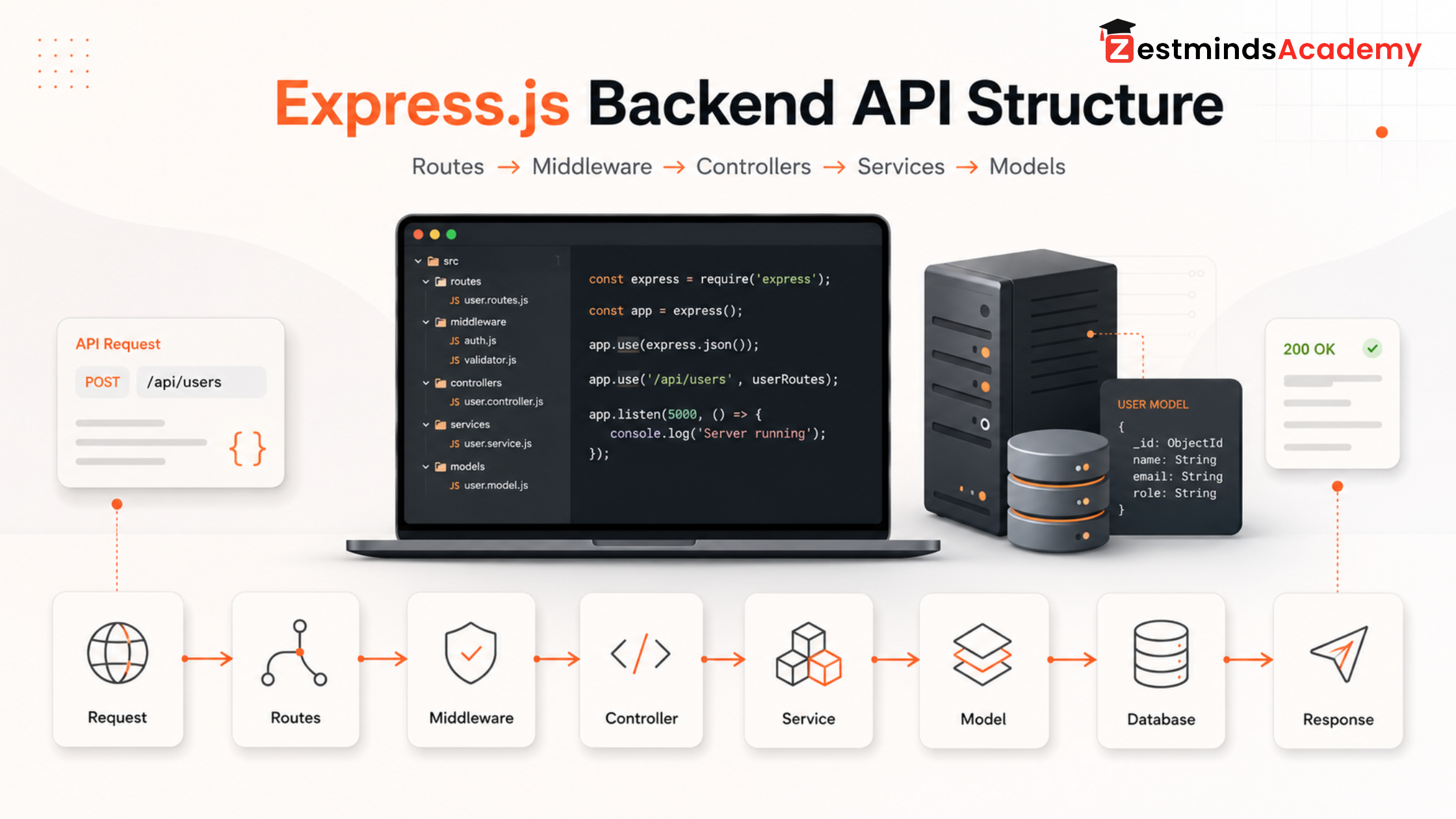
For example, instead of writing all user registration logic inside authRoutes.js, a better structure would separate route handling, validation, password logic, database operations, and response formatting.
Learn validation and error handling
Frontend validation is useful, but it is not enough.
Backend validation is necessary because users can send incorrect or unsafe data directly to your API.
A real backend should handle:
- missing fields
- invalid email
- weak password
- duplicate user
- unauthorized access
- invalid token
- database errors
- unexpected server errors
This is where many student projects look weak. The project may work when everything is correct, but it breaks badly when input is wrong.
Understand middleware
Middleware is one of the most important backend concepts in Express.js projects.
It can be used for:
- checking authentication
- verifying user roles
- validating requests
- logging requests
- handling errors
- protecting routes
If you want to build real MERN projects, middleware is not optional. It helps keep backend logic clean and reusable.
Step 3: Understand Authentication and Role-Based Access
Basic login/signup is not enough for real projects.
A proper application needs both authentication and authorization.
Authentication means: who is the user?
Examples:
- user login
- user signup
- password verification
- token verification
- checking whether the user is logged in
Authorization means: what can the user access?
Examples:
- admin can manage users
- student can view courses
- trainer can upload lessons
- normal user cannot access admin dashboard
This difference is very important.
A student may build a login page, but if anyone can open the admin route by changing the URL, the project is not secure.
After basics, learn:
- JWT flow
- protected routes
- refresh token concept
- role-based access
- backend route protection
- frontend route protection
- logout handling
- token expiry handling
Example:
Learning management system: Admin → add courses, manage users Trainer → upload lessons, review students Student → view enrolled courses Guest → view public pages only
| Concept | Meaning | Example in a MERN Project |
|---|---|---|
| Authentication | Checks who the user is | User login and token verification |
| Authorization | Checks what the user can access | Admin can manage users, student cannot |
| Protected Route | Blocks access without valid login | Dashboard route only opens after login |
| User Role | Defines user permissions | Admin, trainer, student, guest |
| Token Expiry | Limits how long access remains valid | User may need to login again or refresh token |
This is how real applications work.
Step 4: Learn Database Thinking: MongoDB + SQL Basics
MERN students usually start with MongoDB, and that is completely fine.
But after basics, you should not only think in terms of “insert data” and “get data.”
You should think about:
- what data needs to be stored
- how collections or tables relate to each other
- how data will be searched
- how data will be filtered
- how reports will be generated
- how duplicate data will be avoided
- how performance will be handled
MongoDB skills after basics
Improve your MongoDB knowledge in these areas:
- schema planning
- references between collections
- embedded vs referenced data
- indexes
- aggregation basics
- pagination
- search filters
- data consistency
For example, a job portal project may have users, companies, jobs, applications, saved jobs, and admin reports. If your database design is weak, your project will become difficult to manage later.
Why SQL basics still matter
Even if you are learning MERN, SQL is still useful.
Many real companies use SQL databases. SQL also improves your understanding of structured data, relationships, joins, and reporting.
At Zestminds Academy, MERN / Full Stack learners are introduced to both MongoDB and SQL basics because database thinking matters more than memorizing one database only.
MongoDB helps you work with document-style data. SQL helps you understand structured relationships. Learning both makes your database thinking stronger.
| Area | MongoDB Thinking | SQL Thinking | Why It Matters |
|---|---|---|---|
| Data structure | Documents and collections | Tables and rows | Helps students choose the right data model |
| Relationships | References or embedded documents | Foreign keys and joins | Improves planning for users, roles, orders, and reports |
| Searching and filtering | Queries, indexes, aggregation | WHERE, JOIN, GROUP BY, indexes | Helps build dashboards and filtered data views |
| Reporting | Aggregation pipelines | SQL queries and grouped reports | Useful for admin panels, analytics, and business apps |
| Project use cases | Flexible document-style apps | Structured relationship-heavy apps | Makes students more adaptable in real projects |
Step 5: Learn TypeScript After JavaScript Basics
TypeScript is a good next step after MERN basics, but only when your JavaScript fundamentals are clear.
Do not start TypeScript just to look advanced. Start it because your projects are becoming bigger.
TypeScript adds type support to JavaScript and helps catch many mistakes earlier during development. You can explore the official TypeScript documentation when you are ready to go deeper.
Where TypeScript helps in MERN projects
TypeScript is useful for:
- React props
- API response types
- form data
- backend request bodies
- service functions
- reusable interfaces
- team-based development
For example, if your API returns a user object, TypeScript helps you define what that user object should contain. This reduces confusion while working with frontend and backend data.
JavaScript gives flexibility. TypeScript adds discipline.
But remember: TypeScript is not a replacement for JavaScript understanding. It is a layer on top of it.
Step 6: Learn Git and GitHub Workflow Properly
Many students use GitHub like cloud storage.
They finish a project, upload everything once, and think the job is done.
That is not a professional workflow.
After basics, learn:
- Git commits
- branches
- pull requests
- merge conflicts
- .gitignore
- README writing
- project setup instructions
- environment variable examples
- issue tracking basics
A good GitHub project should show how you worked, not only the final code.
A strong student project repository should include:
README file Project screenshots Setup instructions Frontend/backend folder explanation Environment variable sample Meaningful commits Deployed project link Feature list
This helps during interviews also because you can explain your project confidently.
Step 7: Learn Deployment: Vercel, Render, AWS, and Environment Setup
A project that only runs on your laptop is still incomplete.
After MERN basics, students should learn how deployment works.
You do not need to become a DevOps engineer immediately, but you should understand how to make your project live.
Learn frontend deployment
For React or Next.js frontend, students commonly use platforms like Vercel.
You should understand:
- build process
- environment variables
- API base URL
- production errors
- routing issues
- deployment previews
Learn backend deployment
For backend, students may use platforms like Render, AWS, VPS, or similar hosting options.
You should understand:
- server start command
- environment variables
- database connection string
- CORS setup
- logs
- API testing after deployment
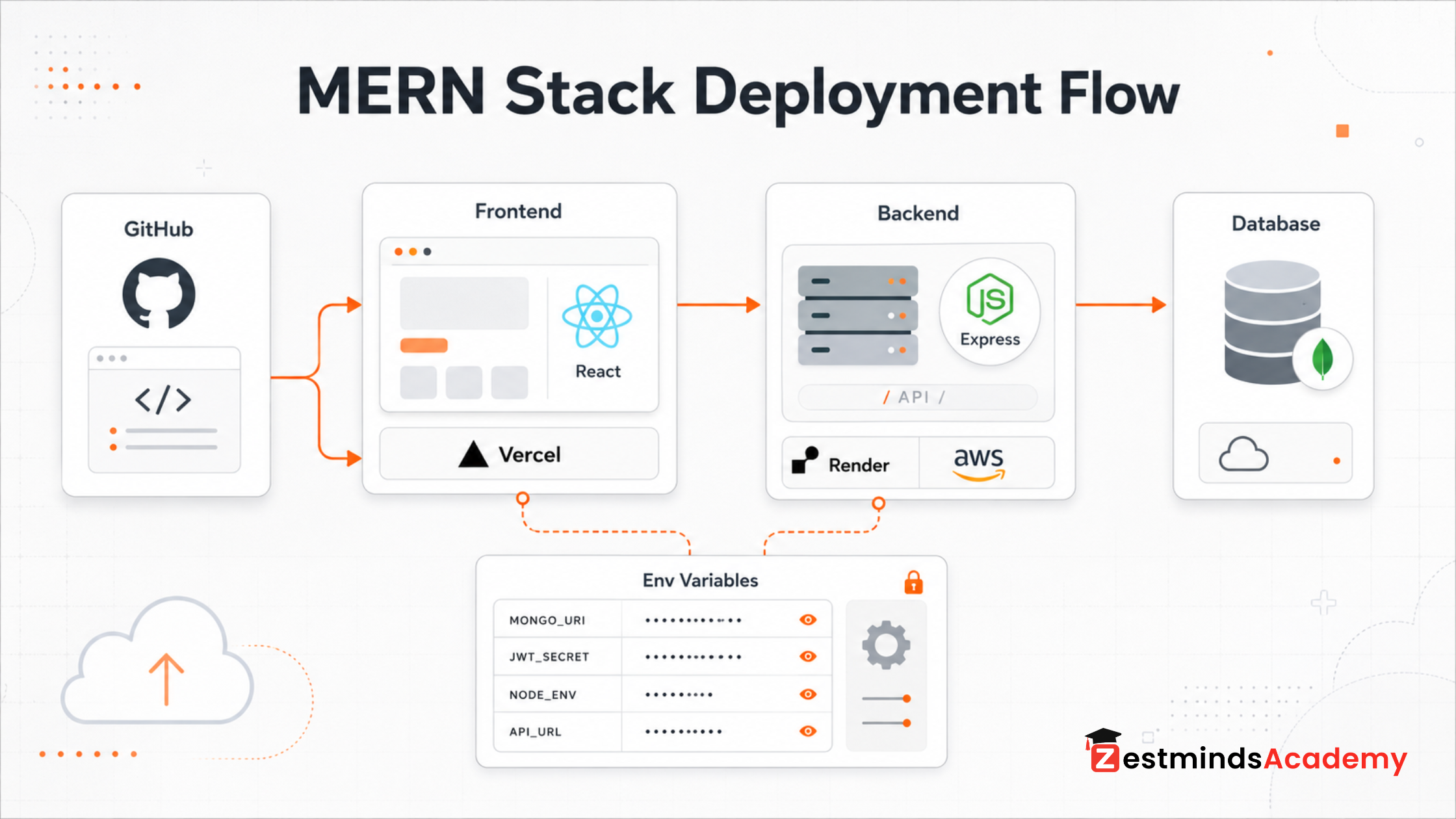
Learn cloud basics
AWS basics are useful because many real projects use cloud services in some form.
You do not need to learn every AWS service at the beginning. Start with basic ideas:
- server
- storage
- environment
- deployment
- access keys
- security
- logs
Practical warning:
Never expose API keys. Never expose database URLs. Never expose JWT secrets. Never expose AWS credentials. Never push .env files to public GitHub repositories.
This is one of the most common student mistakes.
Step 8: Build Advanced MERN Projects, Not Only CRUD Apps
Todo apps, calculators, and simple CRUD projects are fine at the beginning.
But after basics, you need projects that show real application flow.
A good advanced MERN project should include:
- login and roles
- dashboard
- search and filters
- forms and validation
- file upload
- database relationships
- protected APIs
- admin/user workflows
- deployment
- error handling
- GitHub documentation
Advanced MERN project ideas for students
Good project ideas include:
- Role-based admin dashboard
- Student management system
- Learning management system mini-project
- Job portal
- E-commerce admin panel
- CRM-style dashboard
- Booking or appointment system
- Expense tracker with analytics
- Blog/CMS with admin panel
- Internship/job application tracker
The project does not need to be huge. But it should be complete.
A small complete project is better than a large incomplete project.
Step 9: Learn Debugging and Project Communication
Real developers do not write perfect code on the first attempt.
They debug.
This is one of the biggest differences between tutorial learning and real development.
After MERN basics, learn how to debug:
- React blank screen errors
- API 401 or 403 errors
- CORS issues
- MongoDB connection errors
- wrong environment variables
- failed deployment builds
- form submission problems
- token expiry issues
- backend validation errors
Use browser DevTools. Check the Network tab. Read console errors carefully. Test APIs using Postman or similar tools. Check backend logs. Read the actual error message before changing random code.
A simple debugging workflow can look like this:
- Read the error message carefully.
- Check the browser console.
- Check the Network tab.
- Test the API directly.
- Check backend logs.
- Verify environment variables.
- Check database connection.
- Explain what caused the issue and how you fixed it.
Also learn how to explain your project.
In interviews or project reviews, you should be able to explain:
- why you selected this project
- how frontend and backend connect
- how authentication works
- how database collections or tables are designed
- how deployment works
- what problems you faced
- how you fixed them
A good developer is not someone who never gets errors. A good developer knows how to trace and fix errors.
Common Mistakes Students Make After Learning MERN Basics
Here are mistakes we commonly see from students after they complete basic MERN tutorials:
- Learning too many technologies too early
- Copying tutorials without independent practice
- Ignoring backend structure
- Avoiding database design
- Not deploying projects
- Weak GitHub presentation
- Calling themselves full-stack too early
1. Jumping to too many technologies too early
Some students learn basic React today, then jump to Next.js tomorrow, then Docker, then AWS, then AI integration.
This creates confusion.
Learn in sequence. Build one complete project before adding too many tools.
2. Copying tutorials without independent practice
Watching a tutorial feels productive, but real learning starts when you build without copying every line.
After watching a tutorial, rebuild the same feature in your own way.
3. Ignoring backend structure
Many students focus only on frontend because it is visible.
But full-stack development needs backend maturity also.
4. Avoiding database design
If your database is poorly planned, your project will become messy later.
Spend time thinking about data before writing code.
5. Not deploying projects
A deployed project gives you confidence. It also helps others review your work.
6. Weak GitHub presentation
A project without README, setup guide, screenshots, or proper commits looks incomplete.
7. Saying “full stack developer” too early
Knowing basic frontend and backend does not automatically make you project-ready.
A full-stack developer should understand the complete flow from UI to API to database to deployment.
A Practical Learning Order After MERN Basics
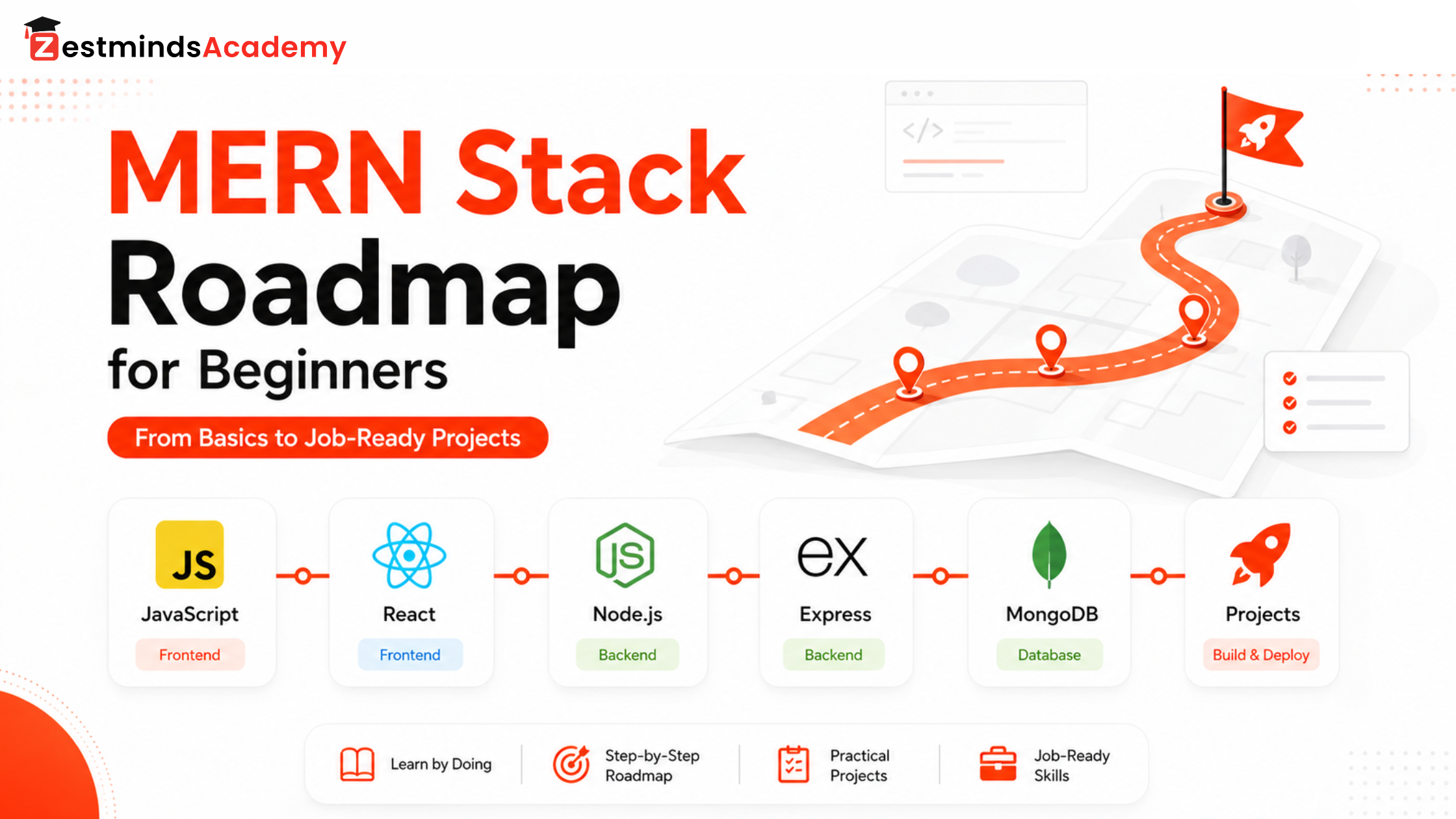
Here is a simple learning order you can follow:
1. Improve React structure and API integration 2. Learn Express backend architecture 3. Understand authentication and roles 4. Improve MongoDB and learn SQL basics 5. Learn TypeScript 6. Use Git and GitHub properly 7. Deploy projects using Vercel, Render, AWS, or similar platforms 8. Build advanced full-stack projects 9. Practice debugging and project explanation
Do not try to master everything in one week.
Move step by step. Build while learning.
Learn From a Real Project Perspective
At Zestminds Academy, MERN learners are guided by working professionals who understand real project development, not only classroom theory.
For example, Raghav Mahajan, Senior UI/UX & React Developer and MERN Stack Specialist, brings 7 years of professional experience in frontend development, UI structure, React.js, API integration, and modern web application flow.
His training approach focuses on helping students understand how professional frontend and MERN projects are planned, structured, debugged, and improved.
Trainer Note: After MERN basics, the real challenge is not writing another CRUD app. The real challenge is understanding how frontend, backend, database, authentication, and deployment work together in one complete application.
How Structured Practical Training Helps After MERN Basics
Self-learning is useful. Many good developers start with self-learning.
But after basics, students often need guidance because the problems become practical:
- Why is my API not connecting?
- Why is my token not working?
- Why is my deployment failing?
- Why is my folder structure messy?
- Why is my dashboard slow?
- Why is my database design confusing?
- How should I explain this project in an interview?
This is where structured training helps.
- Project review
- Doubt clearing
- API debugging support
- Git workflow guidance
- Deployment support
- Database planning
- Interview explanation practice
- Local classroom discipline
For students in Mohali, Chandigarh, Kharar, Zirakpur, Panchkula, and nearby areas, offline practical training can be useful because they get direct guidance, doubt-clearing, project review, and classroom discipline.
At Zestminds Academy, the MERN Stack Training in Mohali is designed around practical full-stack learning, including React, Node.js, Express.js, MongoDB, SQL basics, TypeScript, Git/GitHub workflow, deployment, and advanced projects.
This does not mean every student must join a course. But if you are stuck after basics and need a structured path, guided project-based learning can save time and reduce confusion.
Final Checklist: Are You Ready for Real MERN Projects?
You are moving in the right direction if you can:
- Structure React components clearly
- Create backend APIs with routes, controllers, and middleware
- Connect frontend and backend properly
- Build authentication and protected routes
- Add role-based access for admin/user flows
- Work with MongoDB and understand SQL basics
- Use Git branches and meaningful commits
- Write a useful README file
- Deploy frontend and backend
- Handle environment variables safely
- Debug common frontend/backend errors
- Explain your project clearly in interviews or reviews
If many points in this checklist feel difficult, that is normal. It simply means your next learning stage is practical project development.
FAQs
What should I learn after MERN Stack basics?
After MERN basics, learn React project structure, backend API architecture, authentication, role-based access, MongoDB schema planning, SQL basics, TypeScript, Git/GitHub workflow, deployment, debugging, and advanced full-stack projects.
Why do students get stuck after learning MERN basics?
Students usually get stuck because tutorial projects do not fully teach real application structure, database planning, authentication flow, deployment, Git workflow, debugging, and project explanation. They know syntax, but they have not yet practiced complete project development.
Should I learn TypeScript after MERN?
Yes, but only after your JavaScript basics are strong. TypeScript helps when your projects become larger and you need better code safety, clearer API data handling, and more maintainable React or Node.js code.
Should I learn Next.js after React?
Yes, Next.js can be a good next step after React, but do not jump too early. First become comfortable with React components, state, props, forms, API integration, and routing concepts. After that, Next.js will make more sense.
Should MERN students learn SQL also?
Yes, at least SQL basics. MongoDB is important for MERN, but SQL helps you understand structured data, relationships, joins, and reporting. Learning both improves your database thinking.
Which projects should I build after MERN basics?
Build projects that include real application flow, such as an admin dashboard, learning management system, job portal, CRM-style dashboard, e-commerce admin panel, booking system, CMS, or student management system.
Is deployment important for MERN Stack students?
Yes. Deployment is important because it shows that your project can run outside your local laptop. It also teaches environment variables, build errors, hosting, CORS, backend connection, and production debugging.
Is MERN enough to become job-ready?
MERN basics alone are usually not enough. To become more project-ready, you need practical experience with project structure, APIs, authentication, database planning, Git, deployment, debugging, and real projects. No course or stack can guarantee a job, but practical project work improves your readiness.
Final Thought
After MERN basics, do not keep learning randomly.
Pick one serious project. Plan it properly. Build the frontend, backend, database, authentication, roles, Git workflow, and deployment. Then debug it, improve it, and learn how to explain it.
That is how you move from:
“I know MERN basics”
to:
“I can build real full-stack projects”
If you want guided practice with real project flow, you can explore Zestminds Academy’s MERN / Full Stack Development Training and see whether the structure matches your current learning stage.
Table of Contents
- Why MERN Basics Are Not Enough for Real Projects
- Basic MERN Learning vs Real Project MERN Learning
- Step 1: Strengthen React Beyond Basic Components
- Step 2: Learn Proper Backend and API Structure
- Step 3: Understand Authentication and Role-Based Access
- Step 4: Learn Database Thinking: MongoDB + SQL Basics
- Step 5: Learn TypeScript After JavaScript Basics
- Step 6: Learn Git and GitHub Workflow Properly
- Step 7: Learn Deployment: Vercel, Render, AWS, and Environment Setup
- Step 8: Build Advanced MERN Projects, Not Only CRUD Apps
- Step 9: Learn Debugging and Project Communication
- Common Mistakes Students Make After Learning MERN Basics
- A Practical Learning Order After MERN Basics
- Learn From a Real Project Perspective
- How Structured Practical Training Helps After MERN Basics
- Final Checklist: Are You Ready for Real MERN Projects?
- FAQs
- Final Thought
Raghav Mahajan
Stay Ahead with Expert Insights & Trends
Explore industry trends, expert analysis, and actionable strategies to drive success in AI, software development, and digital transformation.
Begin Your Journey to a Successful Tech Career
Talk to our mentors and choose the right training program.
Call us: +91-9056277961
Email us: hello@zestmindsacademy.com