Why Your MERN Projects Still Look Like Practice Apps, Not Real Applications
Many students say they have built MERN projects.
They may have created a login page, signup form, dashboard, CRUD APIs, MongoDB models, and even deployed the project. But when someone opens it, the project still feels like a tutorial assignment.
The buttons work, the pages open, the API responds, and the database stores data. Yet something still feels missing.
That missing part is usually not one more feature. It is real application thinking.
A real MERN application is not just a CRUD project with a better UI. It has complete user flows, meaningful validation, proper UI states, role-based access, backend planning, database thinking, and enough polish to feel usable.
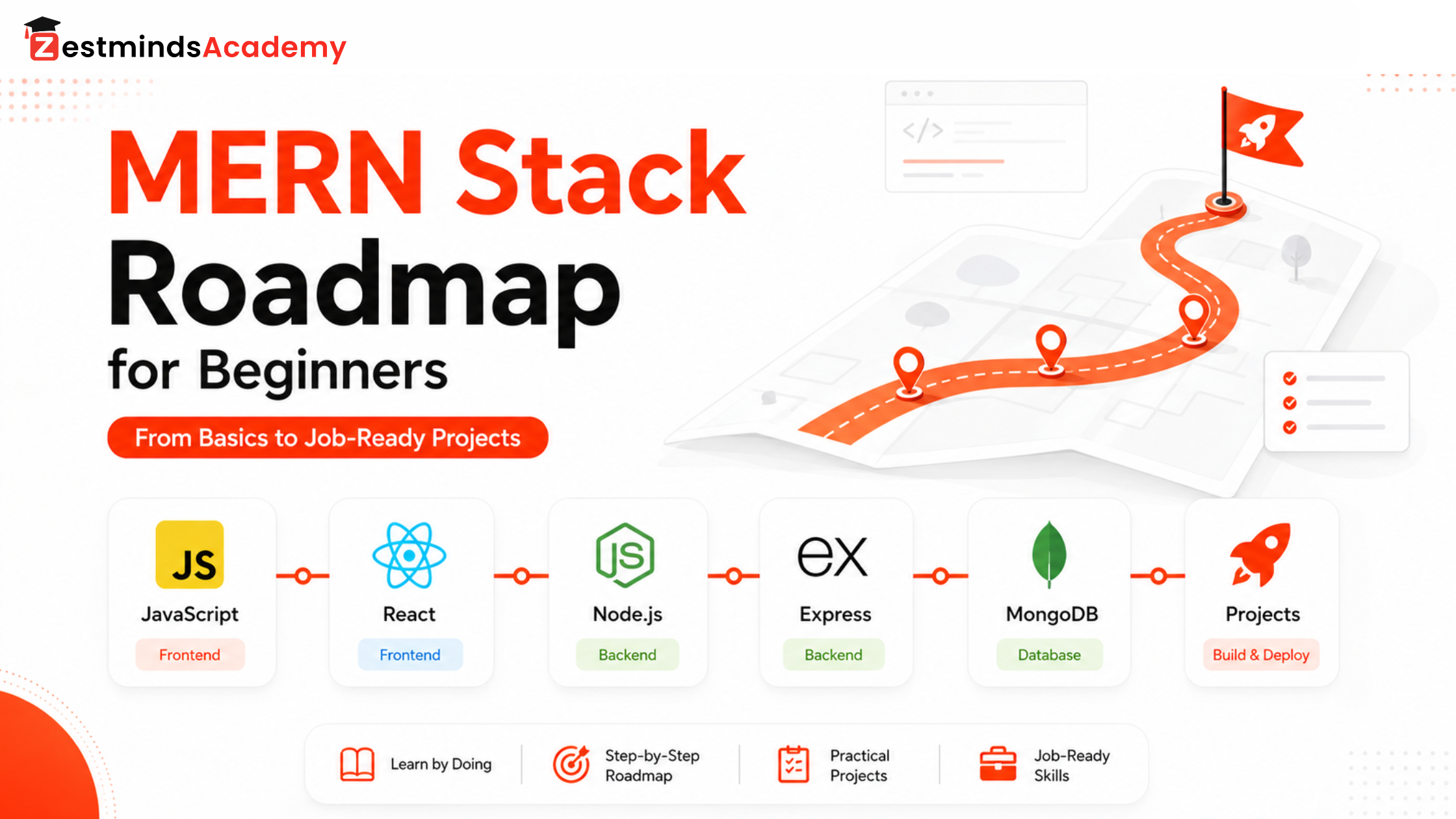
If you are still unsure which MERN concepts to learn and in what order, follow the MERN stack roadmap for beginners before trying to add more features.
Students who want guided full-stack practice, debugging support, API development, MongoDB planning, and project-style learning can also explore our MERN Stack Training in Mohali.
This guide explains why working MERN projects can still look like practice apps and what you should improve to make one project feel closer to a real application.
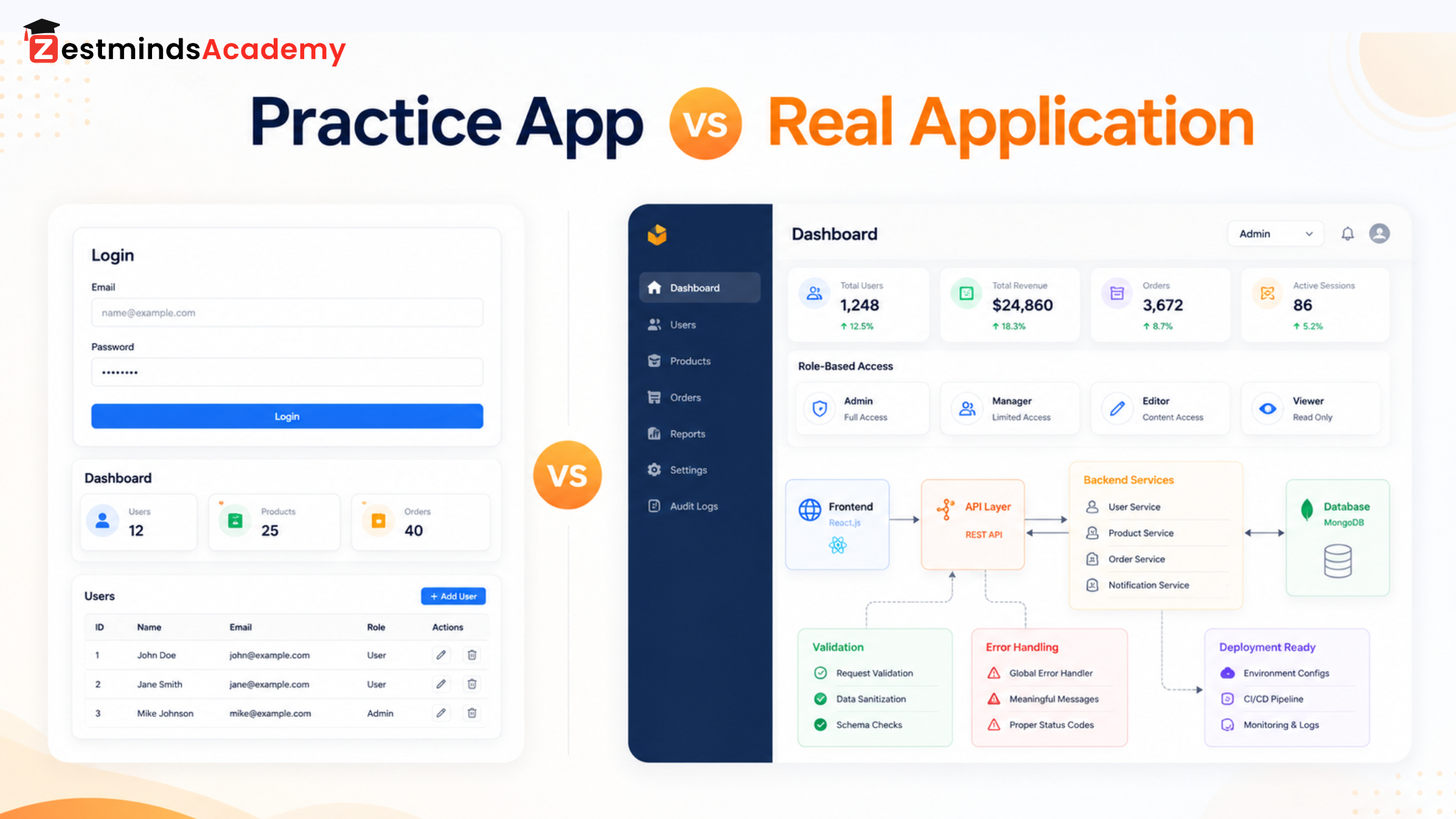
A Working MERN Project Is Not Always a Real Application
One of the biggest mistakes students make is thinking:
If my project is working, it is ready.
Working is important, but it is only the first step.
A practice app usually proves that you know the basics. A real application shows that you understand how users, data, errors, permissions, and features work together.
For example, a practice job portal may have:
- user signup
- login
- job listing
- apply button
- basic dashboard
That is a good start.
But a real job portal also needs:
- employer and candidate roles
- profile completion flow
- resume upload handling
- saved jobs
- application status
- search and filters
- admin approval
- proper error messages
- empty states
- loading states
- secure access control
The difference is not only the number of features.
The difference is how complete and connected the experience feels.
Practice Apps Have Features. Real Apps Have User Flows
Many MERN projects look like practice apps because they are built page by page, not flow by flow.
A student thinks:
“I need a login page.”
“I need a dashboard.”
“I need a product page.”
“I need an add button.”
That approach creates pages, but not always a real user experience.
A real application thinks in flows:
- What happens after signup?
- Does the user need email verification?
- What happens if login fails?
- What does the dashboard show when there is no data?
- Can the user edit their profile?
- What happens after form submission?
- Can users access pages they are not allowed to access?
- What should happen when the server is down?
These small details make a project feel real.
For example, in a learning management system, adding a course list is not enough. A real flow may include student login, course enrollment, progress tracking, lesson completion, assignment submission, instructor review, and certificate generation.
That is product thinking.
Without user flow, a MERN project feels like a collection of screens.
React’s official guide on React’s component thinking guide is also useful for understanding how components, state, and data flow should be planned instead of building screens randomly.
Your UI Looks Basic Because Important States Are Missing
A project does not look basic only because of colors or fonts.
Many projects look basic because they do not handle different UI states.
A real application needs:
- loading state
- empty state
- error state
- success state
- disabled state
- validation state
- unauthorized state
- no internet/server error state
For example, when a student submits a form, many practice projects simply send the data and reset the form.
But a real application should think:
- Is the submit button disabled while the request is processing?
- Is there a loading indicator?
- What message appears after success?
- What happens if the email already exists?
- Are required fields clearly shown?
- Does the user understand what went wrong?
- Is the error coming from frontend validation or backend validation?
These small details create trust.
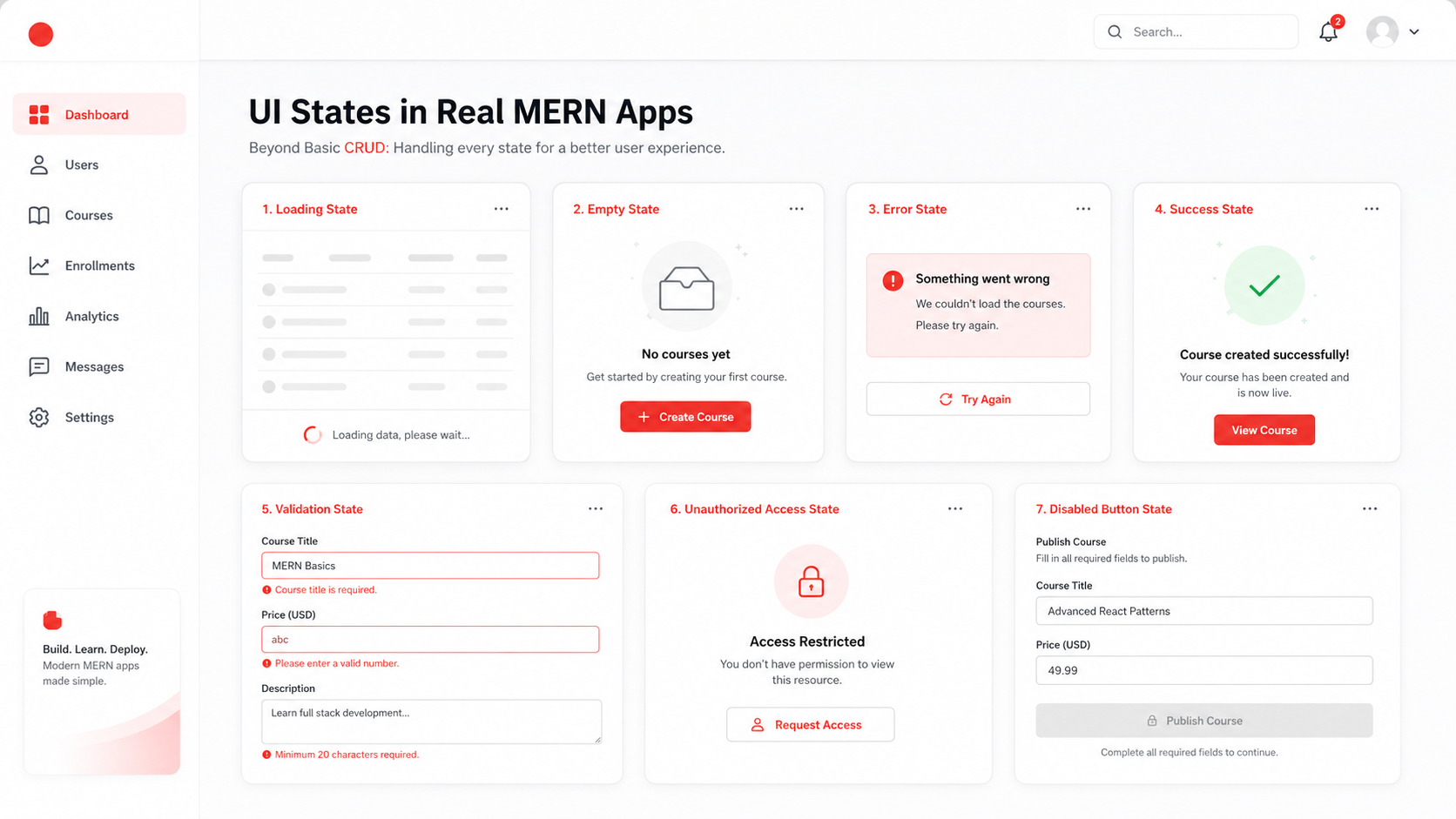
A simple dashboard also needs these states.
If there are no records, do not show an empty table. Show a helpful message like:
No jobs posted yet. Create your first job listing.
That feels much more real than a blank screen.
Your Backend Looks Like a Tutorial Because Everything Is Inside Routes
Many MERN projects look like practice apps because the backend is written like a tutorial.
Everything goes inside route files.
One file handles:
- request
- validation
- database query
- business logic
- response
- error handling
This is okay for learning basics, but it becomes messy when the project grows.
A cleaner backend usually separates:
- routes
- controllers
- services
- middleware
- models
- validation
- error handling
- authentication
- authorization
For example, a route should not do everything. It should mainly receive the request and pass work to the right controller or service.
When backend logic is not separated, every new feature becomes risky. You change one route, and something else breaks.
This is one reason practice projects do not feel production-ready.
The project works, but the structure does not show real backend thinking. This becomes even more important when students use code-generation tools without planning the application first. Read why AI can write MERN code but cannot replace MERN architecture thinking.
The official Express routing guide is a useful reference for understanding routes clearly before moving toward controllers, services, middleware, and larger backend structure.
Your Database Design Is Too Simple for Real Use Cases
MongoDB is flexible, but flexibility does not mean random data storage.
Many learners create collections only because the tutorial says so:
- users
- products
- orders
- blogs
- jobs
But real applications need better data thinking.
For example, in an ecommerce project, an order is not just a product ID and user ID.
You need to think:
- Should the order store product price at the time of purchase?
- What if product price changes later?
- Should address be copied into the order?
- How will order status be tracked?
- How will payment status be stored?
- How will admin filter orders?
- Which fields will be searched often?
A practice app stores data. A real application plans data.
This is a major difference.
If your database is not planned around real usage, your MERN project will feel incomplete when features increase.
Real Applications Handle Roles and Permissions
Many student MERN projects have only one type of user.
That makes the project simple, but also less real.
Most real applications have roles.
For example:
- admin
- user
- instructor
- student
- employer
- candidate
- manager
- support team
Different roles should see different things and perform different actions.
In a job portal:
- candidates can apply for jobs
- employers can post jobs
- admins can approve or reject job posts
- candidates should not access employer dashboard
- employers should not access admin controls
In a learning platform:
- students can watch lessons
- instructors can upload content
- admins can manage users and courses
Role-based access makes the project feel closer to a real application.
Without it, the project often feels like a simple demo.
Practice Projects Ignore Edge Cases
Edge cases are where real development begins.
A practice project usually handles the happy path:
User enters correct data.
API works.
Database saves data.
Page shows result.
But real users do not always behave perfectly.
They may:
- enter wrong email
- submit empty forms
- refresh the page
- upload large files
- lose internet connection
- open a protected page without login
- use expired tokens
- search for something that does not exist
- click a button multiple times
- try to access another user’s data
A real application handles these situations properly.
For example:
- duplicate email should show a clear message
- expired token should redirect to login
- invalid form should show field-level errors
- empty search should show a helpful empty state
- unauthorized access should be blocked
- failed API request should not break the whole page
When these details are missing, the project looks like a practice app.
Deployment and Environment Setup Matter
Many learners stop at:
It works on localhost.
But real applications need more than localhost.
A portfolio-ready MERN project should have:
- deployed frontend
- deployed backend
- connected database
- environment variables
- proper API base URL
- error handling after deployment
- working authentication in production
- CORS configured properly
- image/file upload tested
- basic performance check
A project that works locally but fails after deployment does not feel real.
Deployment teaches many practical things that tutorials often hide.
For example:
- environment variables are different in production
- frontend and backend may run on different domains
- cookies or tokens may behave differently
- database connection may fail
- CORS errors may appear
- file paths may break
These are real development problems.
A strong MERN project should not only be built. It should be usable.
What Makes a MERN Project Portfolio-Ready?
A portfolio project should show more than basic coding.
It should show that you can think like a developer.
Before adding a MERN project to your portfolio, ask:
- Does the project solve a clear problem?
- Is the user flow complete?
- Are loading, empty, error, and success states handled?
- Is authentication implemented properly?
- Are roles and permissions included where needed?
- Is the backend structure clean?
- Are APIs consistent?
- Is validation handled on frontend and backend?
- Is the database planned for real usage?
- Is the project deployed and working?
- Can another developer understand the code?
- Can you explain your technical decisions in an interview?
This last point is very important.
In interviews, a good project is not only judged by screenshots. It is judged by how well you explain:
- why you built it
- how you structured it
- what problems you solved
- what mistakes you fixed
- how data flows
- how APIs work
- how authentication works
- how you would improve it later
If you cannot explain your own project, it will not create strong trust.
Real Projects Need Product Thinking
A practice app is usually built from the developer’s point of view.
A real app is built from the user’s point of view.
Developer thinking says:
I added the feature.
Product thinking asks:
Can the user complete the task easily?
For example, adding a profile update page is a feature.
But product thinking asks:
- Can the user see current profile data?
- Are required fields clear?
- Is the update button disabled during submission?
- Is success feedback shown?
- What happens if image upload fails?
- Can the user cancel changes?
- Is the experience smooth on mobile?
These details make the project feel mature.
This is why real application development is not only about adding more pages. It is about making the experience complete.
How Practical MERN Learning Helps
Many students do not struggle because they are not capable.
They struggle because they learn MERN in disconnected parts.
They learn React from one tutorial.
Node from another.
MongoDB from another.
Authentication from another.
Deployment from another.
But nobody shows them how everything connects inside one real project.
That is where practical MERN learning matters.
Good MERN training should teach:
- how to plan a project before coding
- how to break features into flows
- how to structure backend code
- how to design APIs
- how to plan MongoDB collections
- how to handle errors and validation
- how to add roles and permissions
- how to debug real issues
- how to deploy and test the project
- how to explain the project in interviews
At Zestminds Academy, the focus of MERN Stack Training is practical full-stack learning, project structure, debugging, API flow, and project-building confidence beyond tutorial-style coding.
For learners around Mohali, Chandigarh, and nearby areas, mentor-led training can be helpful when they have already tried MERN projects but still feel their work does not look professional enough.
You can also explore 45 Days MERN Training in Mohali if you want a focused short-duration learning path, or read the MERN stack roadmap to understand what to learn step by step.
After completing basic CRUD projects, read what to learn after MERN stack basics to plan your next skills in architecture, authentication, testing, deployment, performance, and real project development.
Final Thought
Your MERN project does not look like a practice app because you are bad at coding.
It usually looks like a practice app because it is missing real application thinking.
A real application is not only about login, CRUD, and dashboard pages.
It needs user flow, proper states, backend structure, database planning, role-based access, edge case handling, deployment readiness, and clear explanations.
So instead of asking:
The question is not, “How many MERN projects should I build?” The better question is, “Can I make one MERN project feel like a real application?”
That question will improve your skills much faster.
FAQs
Why do my MERN projects look basic?
MERN projects usually look basic when they only include simple CRUD features and miss real user flows, UI states, validation, role-based access, backend structure, and deployment readiness.
What makes a MERN project look like a real application?
A real MERN application has complete user flow, clean UI states, proper authentication, role-based permissions, structured backend code, planned database design, error handling, and deployment.
Is CRUD enough for a MERN portfolio project?
CRUD is a good starting point, but it is not enough for a strong portfolio project. A portfolio-ready MERN project should also show authentication, validation, API design, database planning, roles, deployment, and practical problem-solving.
How can I make my MERN project portfolio-ready?
Make your project portfolio-ready by solving a real problem, improving UI states, separating backend logic, planning MongoDB data, adding proper authentication, handling edge cases, deploying the project, and preparing to explain your decisions.
Should every MERN project have roles and permissions?
Not every project needs multiple roles, but many real-world applications do. If your project includes different types of users, role-based access can make it feel more realistic and professional.
Why does my MERN project work locally but fail after deployment?
This usually happens because of environment variables, API base URLs, CORS settings, database connection issues, token/cookie behavior, or file path problems. Testing deployment is part of real project development.
What should I learn after building basic MERN projects?
After basic MERN projects, learn project planning, API design, authentication, authorization, MongoDB modeling, backend architecture, React state handling, error handling, deployment, debugging, and Git workflow.
Table of Contents
- A Working MERN Project Is Not Always a Real Application
- Practice Apps Have Features. Real Apps Have User Flows
- Your UI Looks Basic Because Important States Are Missing
- Your Backend Looks Like a Tutorial Because Everything Is Inside Routes
- Your Database Design Is Too Simple for Real Use Cases
- Real Applications Handle Roles and Permissions
- Practice Projects Ignore Edge Cases
- Deployment and Environment Setup Matter
- What Makes a MERN Project Portfolio-Ready?
- Real Projects Need Product Thinking
- How Practical MERN Learning Helps
- Final Thought
- FAQs
Raghav Mahajan
Stay Ahead with Expert Insights & Trends
Explore industry trends, expert analysis, and actionable strategies to drive success in AI, software development, and digital transformation.
Begin Your Journey to a Successful Tech Career
Talk to our mentors and choose the right training program.
Call us: +91-9056277961
Email us: hello@zestmindsacademy.com