Python Variables and Data Types Explained: The Memory Mistake Most Beginners Miss
Python looks easy when you start.
That is exactly why many beginners become overconfident too early.
You write a few variables, print some values, learn strings, numbers, lists, and dictionaries, and it feels like Python is simple. The first examples are usually clean. The output appears quickly. The syntax does not look heavy. For students coming from school-level programming, college basics, or even non-technical backgrounds, Python feels friendly in the beginning.
But the confusion usually starts later, not on the first day.
- A value that looked like a number behaves like text.
- A list changes even when you did not expect it.
- A dictionary updates from another place in the program.
- Two variable names look different, but both are connected to the same data.
- A small assignment creates a bug that is difficult to understand.
This is where many students realize an important truth:
Learning Python syntax is not the same as understanding Python behavior.
Python variables and data types are not just beginner topics to complete quickly. They decide how your code behaves when the program runs. If you understand them only as definitions, you may still struggle in assignments, debugging, functions, APIs, data handling, and projects.
This guide is written to help you understand Python variables and data types from a practical developer mindset. We will not only discuss what variables and data types are. We will also look at how Python connects names to objects, why assignment is not always copying, why mutable data can surprise beginners, and how memory thinking helps you debug code with more confidence.
You can also follow the full Python roadmap for beginners if you want a step-by-step learning path.

Who This Guide Is For
This guide is for students and beginners who do not want to learn Python only by memorizing definitions.
It is especially useful for:
- BCA, MCA, B.Tech, and diploma students who are starting Python seriously
- Freshers who know basic syntax but feel confused while solving practical problems
- Non-technical students who want to understand programming in a simple but correct way
- Career switchers who are learning Python for software development, data analytics, automation, or AI-related fields
- Students who have learned variables and data types before but still struggle with lists, dictionaries, assignment, and debugging
- Parents who want to understand why practical Python training should go beyond theory and syntax completion
This guide is not written for advanced Python developers looking for deep CPython internals or memory management details. It is written for learners who want to build a strong foundation before moving into functions, projects, APIs, data handling, automation, data science, or AI/ML learning.
If you are at the stage where Python syntax feels easy but practical coding still feels confusing, this guide will help you understand what is happening behind the code in a beginner-friendly way.
Python Looks Easy Until Your Data Starts Behaving Unexpectedly
Most beginners start Python with simple examples.
They learn that a variable stores a value. They learn that numbers are used for calculation, strings are used for text, and lists are used for multiple values.
This is a good starting point.
The problem begins when students stop writing isolated examples and start solving slightly practical tasks.
- Taking input from a user
- Storing multiple marks
- Updating student records
- Passing data into functions
- Working with files
- Reading API responses
- Handling form data
- Creating small project-style assignments
At that stage, Python is no longer only about writing lines of code. It becomes about understanding how data moves, changes, and connects inside the program.
This is where variables and data types become important.
A student who only memorizes definitions may know the names of data types, but still fail to understand why the program behaves in a certain way.
A student who understands data behavior can debug better, choose better structures, and write cleaner code.
That is the difference this guide focuses on.
Python Variables Are Not Boxes — They Are Names Pointing to Data
Many beginners are taught that a variable is a box.
This explanation is easy to understand, but it is not fully accurate for Python.
A better explanation is:
In Python, a variable is a name that points to an object.
This may sound technical, but the idea is simple.
Think of a variable as a label.
The label helps you identify the data, but the label itself is not the data.
For example:
student_name = "Rahul"
age = 21
marks = [85, 90, 95]
Here:
- student_name points to text
- age points to a number
- marks points to a list
At a beginner level, saying “a variable stores a value” is acceptable. But as you grow, this explanation becomes limited.
The stronger mental model is:
variable name -> object/value
This small shift helps you understand why Python behaves differently with numbers, strings, lists, dictionaries, and copied data.
In classroom practice, this is one of the first points where students realize that Python is simple to write, but still needs clear thinking.
Data Types Decide How Your Code Behaves
A data type tells Python what kind of value it is working with.
Python needs to understand whether the value is:
- A number
- Text
- True/false data
- A group of values
- Key-value data
- Fixed data
- Unique data
This matters because data type decides what operations are allowed.
For example, the + symbol behaves differently with numbers and strings.
With numbers, it performs addition.
With strings, it joins text.
That is why 10 + 20 gives 30, but "10" + "20" gives "1020".
The symbol is the same, but the data type changes the meaning.
This is why students should not only ask:
“What is the value?”
They should also ask:
“What type of value is this?”
Python’s official documentation explains built-in types such as numeric types, sequence types, text types, mappings, sets, and more. For deeper reference, you can check the Python built-in types documentation.
The Python Data Types Beginners Should Actually Understand
Beginners do not need to memorize every Python type at once.
Start with the data types that are used most often in real programs.
| Data Type | Simple Meaning | Common Use | Mutable? |
|---|---|---|---|
| int | Whole number | Age, count, marks | No |
| float | Decimal number | Percentage, price, average | No |
| str | Text | Name, email, message | No |
| bool | True/false value | Login status, pass/fail, yes/no decisions | No |
| list | Changeable group of values | Marks, tasks, records, selected items | Yes |
| tuple | Fixed group of values | Values that should not change | No |
| dict | Key-value data | Student record, form data, API response | Yes |
| set | Unique values | Unique IDs, tags, emails | Yes |
The goal is not to remember this table like a school answer.
The goal is to understand when each type makes sense.
How to Think About Data Types Practically
A data type should be selected based on the problem, not only based on what the value looks like.
Use numbers when calculation matters
Use numbers when you want to calculate, compare, count, or measure something.
- Age
- Marks
- Percentage
- Total score
- Number of attempts
- Price
- Quantity
If you need mathematical operations, the value should behave like a number.
Use strings when the value is text
Strings are used for text-based values.
- Student name
- Address
- Course name
- Message
- Password input
- Phone number
A common beginner mistake is thinking that every number-looking value should be treated as a number.
For example, a phone number should usually be treated as text, not a number, because you do not calculate with it.
This is practical thinking.
The better question is not:
“What does this value look like?”
The better question is:
“What will I do with this value?”
Use booleans for decisions
Booleans represent true/false logic.
- Is the student enrolled?
- Has the user logged in?
- Is the form submitted?
- Is the fee paid?
- Did the student pass?
Booleans become important when students start learning conditions, validations, permissions, and decision-making logic.
Use lists when values can change
A list is useful when you have multiple values and those values may change.
- List of students
- List of marks
- List of selected courses
- List of tasks
- List of products
- List of search results
Lists are common in assignments and real projects because data often comes in groups.
Use tuples when values should stay fixed
A tuple is useful when you want to keep a fixed group of values.
Beginners often ask:
“Why use a tuple when a list already exists?”
A simple answer is:
Use a list when values need to change.
Use a tuple when values should stay fixed.
This is not only a syntax difference. It is a design decision.
Use dictionaries when data needs meaning
Dictionaries are one of the most useful Python data types.
They store data in key-value form.
Example:
student = {
    "name": "Rahul",
    "age": 21,
    "course": "Python"
}
This is closer to how real application data is structured.
When students later work with forms, APIs, JSON, dashboards, databases, or backend development, dictionaries become extremely important.
Use sets when uniqueness matters
A set is useful when duplicate values should be removed.
- Unique student IDs
- Unique course names
- Unique tags
- Unique email addresses
A set helps when the same value should not appear again and again.
The Mutable vs Immutable Difference That Confuses Most Beginners
This is one of the most important ideas in Python.
Some values can be changed after they are created. Some cannot.
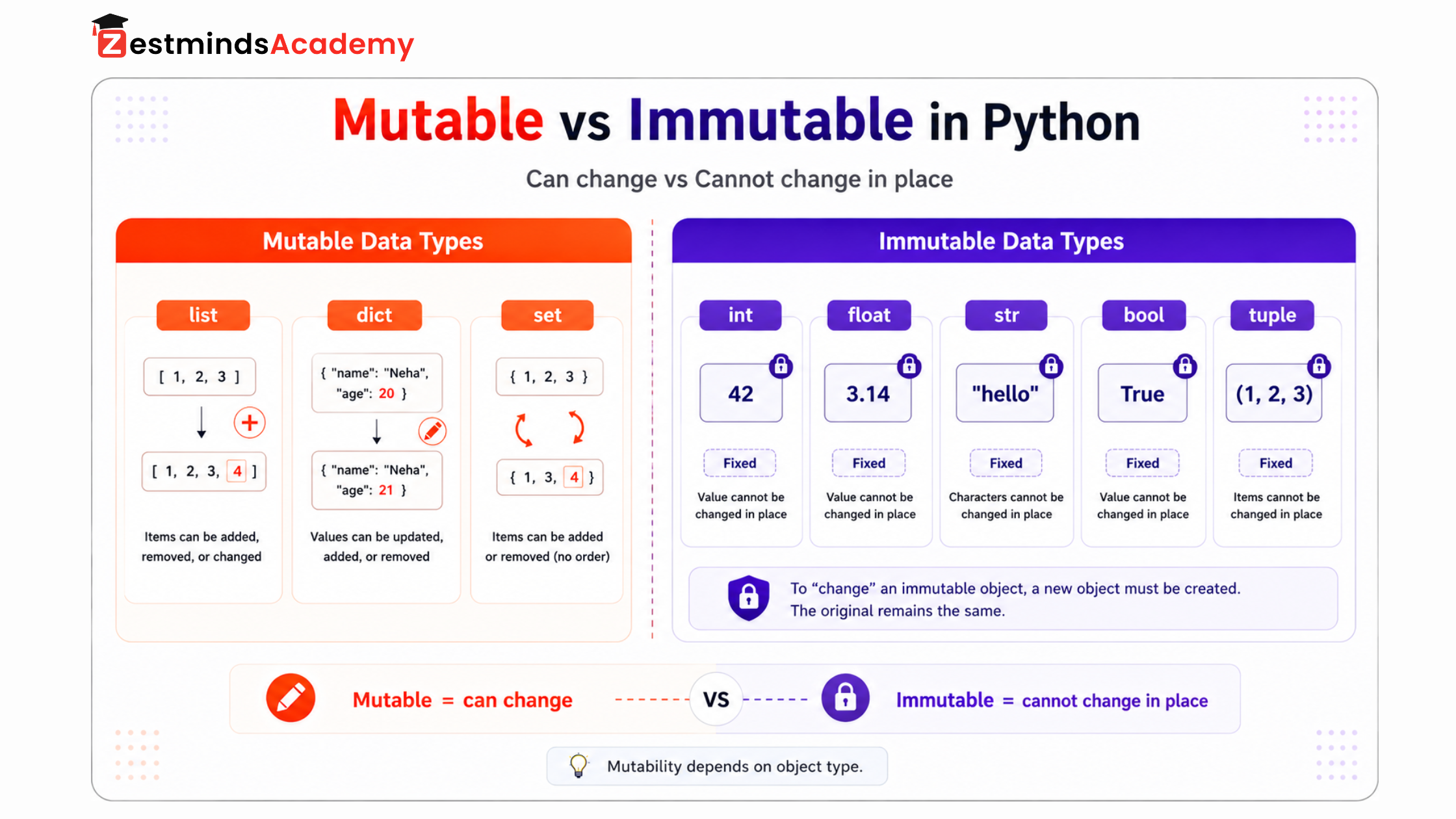
A mutable object can be changed.
An immutable object cannot be changed in place.
At a beginner level, remember this:
| Mutable Data Types | Immutable Data Types |
|---|---|
| list | int |
| dict | float |
| set | str |
| bool | |
| tuple |
Lists, dictionaries, and sets can be changed.
Numbers, strings, booleans, and tuples generally cannot be changed in place.
The official Python data model explains that mutability depends on an object’s type. You can read more in the Python data model documentation.
This concept matters because mutable objects can create unexpected changes when the same object is shared between variables.
For many students, this is the first real memory thinking moment in Python.
Why Assignment Is Not Always Copying in Python
This is the memory mistake most beginners miss.
When students write one variable equal to another, they often assume Python creates a new separate copy.
But assignment does not always mean copying.
For example:
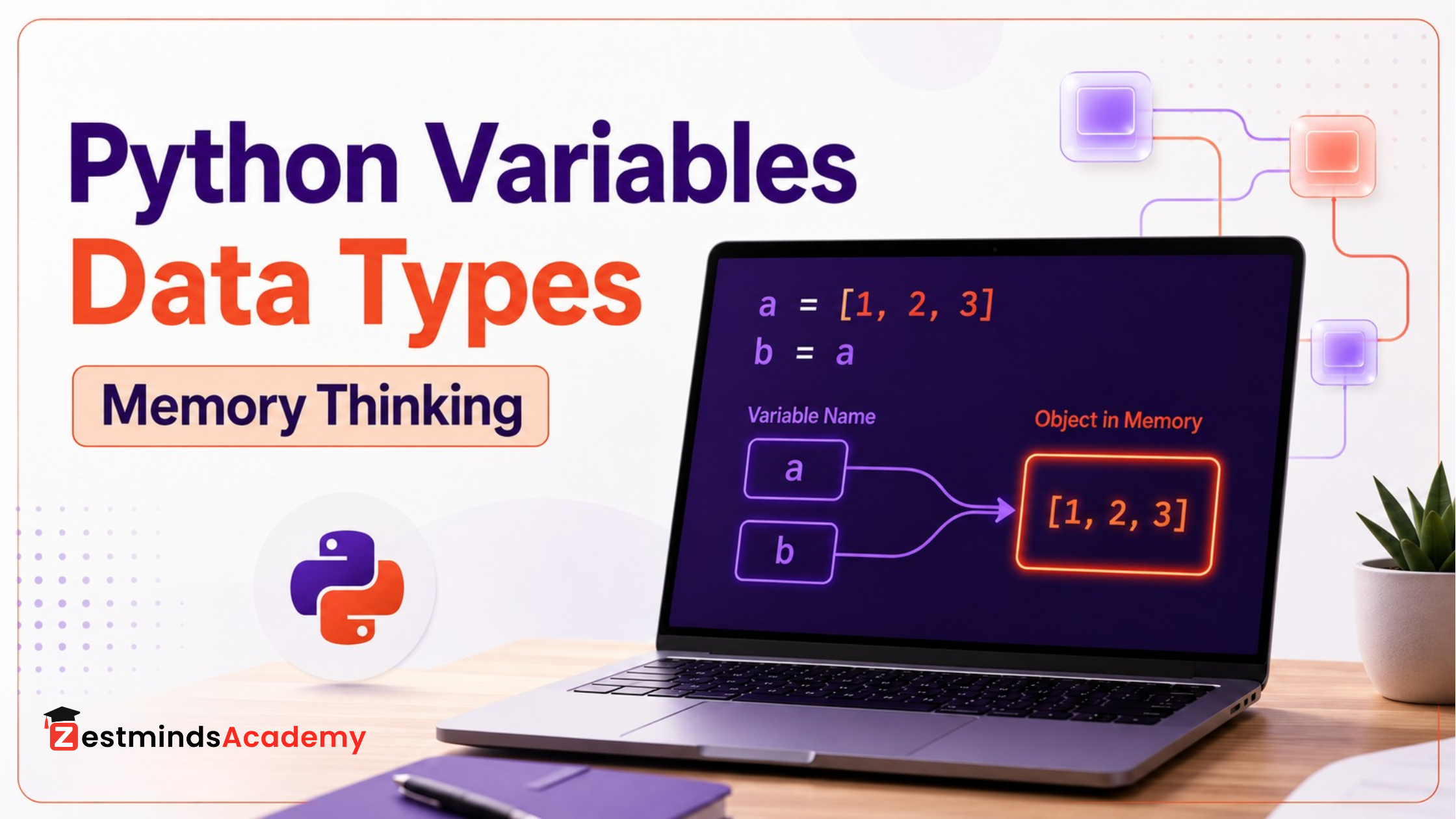
a = [1, 2, 3]
b = a
Many beginners think b is a new list.
Actually, both names are pointing to the same list.
a -->[1, 2, 3]
b --> [1, 2, 3]
So if the list changes through b, that change is also visible through a.
This is not a Python bug.
This is reference behavior.
This example looks small, but it creates confusion in assignments, coding tests, functions, APIs, and project code.
A simple way to remember it:
Assignment means giving another name to something.
Copying means creating a separate object.
These are not always the same.
If you want to understand this behavior more deeply, read this detailed guide on Python runtime, references, and mutability.
The Beginner Mistakes That Make Python Feel Hard Later
Python does not become difficult only because the topics become advanced.
Many times, Python feels difficult because the foundation was learned too quickly.
Here are common mistakes students make with variables and data types.
Mistake 1: Memorizing data types without understanding use cases
Many students can name the data types.
- List
- Tuple
- Dictionary
- Set
But when they are given a practical problem, they cannot decide which one to use.
A better approach is to think from the situation.
Use a list when order and change matter.
Use a tuple when values should stay fixed.
Use a dictionary when values need names or keys.
Use a set when uniqueness matters.
This is how developers think.
They choose data structures based on the problem, not only based on memory.
Mistake 2: Treating user input as the correct type
User input often comes as text.
A student may think the input is a number because the user typed 21, but Python may treat it as a string unless it is converted.
This becomes important in:
- Forms
- Files
- APIs
- Data handling
- Report generation
- Automation scripts
A good debugging habit is to check the type when the output feels wrong.
Mistake 3: Using unclear variable names
Beginner code often uses names like:
x = 10
a = "Rahul"
data = [85, 90, 95]
These names are not always wrong, but overusing them makes code difficult to understand.
Better names explain the purpose:
student_age = 21
student_name = "Rahul"
student_marks = [85, 90, 95]
Good variable names reduce confusion.
They also make code easier to read during assignments, team projects, interviews, and debugging.
Mistake 4: Changing variable meaning again and again
Python allows a variable to point to different types during the program.
A variable may first point to a number and later point to text.
This is allowed, but it can make code confusing.
Professional code keeps meaning clear.
- A variable used for marks should not suddenly become a message.
- A variable used for a student record should not suddenly become a boolean.
- A variable used for a list of courses should not suddenly become one course name.
This is not about Python restriction.
This is about clean coding discipline.
Mistake 5: Ignoring mutability
Students often get confused when lists or dictionaries change unexpectedly.
This usually happens because they do not realize that mutable objects can be changed through different references.
Before changing a list or dictionary, ask:
“Could another variable also be pointing to this same object?”
This one question can prevent many beginner bugs.
How Memory Thinking Makes Debugging Easier
Memory thinking does not mean you need to become an advanced computer science expert on day one.
It means you develop the habit of asking better questions.
When Python code behaves unexpectedly, ask:
- What type of data is this?
- Is this value mutable or immutable?
- Is this variable pointing to a shared object?
- Did I assign or copy?
- Can this data change somewhere else?
- Is this the right data structure for the problem?
When students start asking these questions, their debugging improves.
They stop changing random lines.
They start tracing the flow of data.
This is an important shift from beginner coding to developer thinking.
In practical training, this is often the difference between a student who only follows examples and a student who starts understanding what the program is doing.
How This Foundation Connects to Real Python Projects
Variables and data types are used everywhere in Python projects.
They are not only first-chapter topics.
You use them when you are:
- Storing user input
- Validating form data
- Reading files
- Cleaning data
- Handling API responses
- Working with JSON
- Preparing reports
- Building dashboards
- Writing automation scripts
- Passing data into functions
- Storing database records
For example, in a real application, student data may include:
- Name
- Age
- Course
- Fee status
- Attendance
- Marks
- Assignment submissions
This kind of data needs clear structure.
That is why lists and dictionaries become important.
For students in Mohali, Chandigarh, Kharar, Zirakpur, Panchkula, and nearby areas, Python learning should not stop at completing syntax chapters. Real confidence comes when students apply these concepts through assignments, debugging, and project-style coding tasks.
At Zestminds Academy, this is the type of foundation we focus on while teaching Python practically: not just “what is a variable,” but “how does this data behave when the code runs?”
You can explore the course here: Python Training at Zestminds Academy.
What Students Should Learn After This Foundation
After understanding variables, data types, assignment, and mutability, students should move toward:
- Operators
- Conditions
- Loops
- Functions
- Lists and dictionaries in depth
- File handling
- Error handling
- Object-oriented programming basics
- Small practical assignments
Do not rush directly into big projects without strengthening these basics.
A weak foundation creates confusion later in functions, APIs, backend development, data analytics, automation, and AI/ML learning.
For a structured path, read this next: Python Roadmap for Beginners.
Quick Checklist Before You Move Ahead
Before writing or debugging Python code, ask yourself:
- What type of data am I storing?
- Is this value text, number, list, dictionary, tuple, set, or boolean?
- Will this data change later?
- Should I use a list or a dictionary?
- Is this object mutable or immutable?
- Am I assigning another name or creating a separate copy?
- Can changing this value affect another part of the program?
- Did I check the type when I felt confused?
This checklist may look simple, but it can save a lot of debugging time.
Final Thought: Learn Python Behavior, Not Just Python Syntax
Python variables and data types are not just topics to complete in the first week.
They shape how your code behaves.
A student who only memorizes definitions may feel confident at first, but confusion starts when code becomes practical.
A student who understands variables, data types, mutability, and assignment behavior learns Python with more clarity.
That is the real difference.
You stop asking only:
“What is the syntax?”
You start asking:
“What is happening when this code runs?”
That is how Python learning becomes practical.
Start with the Python roadmap for beginners to plan your learning step by step. And when you feel ready for guided practice, debugging support, assignments, and project-style exposure, explore Zestminds Academy’s practical Python training in Mohali.
FAQs About Python Variables, Data Types, and Memory Thinking
What is a variable in Python?
A variable in Python is a name that refers to a value or object. It helps you store, reuse, and work with data in a program.
What are data types in Python?
Data types define the kind of value Python is working with. Common Python data types include int, float, str, bool, list, tuple, dict, and set.
Why does Python not require variable declaration?
Python is dynamically typed. It decides the data type at runtime based on the value assigned to the variable.
Are Python variables memory locations?
Not exactly. A Python variable is better understood as a name or reference that points to an object in memory.
What is the difference between mutable and immutable data types in Python?
Mutable data types can be changed after creation. Lists, dictionaries, and sets are mutable. Immutable data types cannot be changed after creation. Numbers, strings, booleans, and tuples are generally immutable.
Why does changing one list affect another variable in Python?
This happens when both variables refer to the same list object. Assignment can create another reference to the same object instead of creating a separate copy.
Which Python data types should beginners learn first?
Beginners should first understand numbers, strings, booleans, lists, tuples, dictionaries, and sets. These are used regularly in Python programs and assignments.
What should beginners learn after variables and data types?
After variables and data types, beginners should learn operators, conditions, loops, functions, lists and dictionaries in depth, file handling, error handling, and practical assignments.
Table of Contents
Use this guide to understand the key Python concepts step by step.
- Who This Guide Is For
- Python Looks Easy Until Your Data Starts Behaving Unexpectedly
- Python Variables Are Not Boxes — They Are Names Pointing to Data
- Data Types Decide How Your Code Behaves
- The Python Data Types Beginners Should Actually Understand
- How to Think About Data Types Practically
- The Mutable vs Immutable Difference That Confuses Most Beginners
- Why Assignment Is Not Always Copying in Python
- The Beginner Mistakes That Make Python Feel Hard Later
- How Memory Thinking Makes Debugging Easier
- How This Foundation Connects to Real Python Projects
- What Students Should Learn After This Foundation
- Quick Checklist Before You Move Ahead
- Final Thought: Learn Python Behavior, Not Just Python Syntax
- FAQs About Python Variables, Data Types, and Memory Thinking
Pardeep Kumar
Stay Ahead with Expert Insights & Trends
Explore industry trends, expert analysis, and actionable strategies to drive success in AI, software development, and digital transformation.


Begin Your Journey to a Successful Tech Career
Talk to our mentors and choose the right training program.
Call us: +91-9056277961
Email us: hello@zestmindsacademy.com