Beyond Basic Python: 7 Libraries to Learn Before 2027
Learning variables, conditions, loops, functions, lists and object-oriented programming gives you a Python foundation. But many beginners reach this stage and still struggle with one important question:
“What should I learn after Python basics?”
The next step is not to memorise dozens of package names. It is to learn a small set of Python libraries, frameworks and development tools that help you handle data, connect APIs, build backend applications, validate user input, store information, test code and explore document-based AI applications.
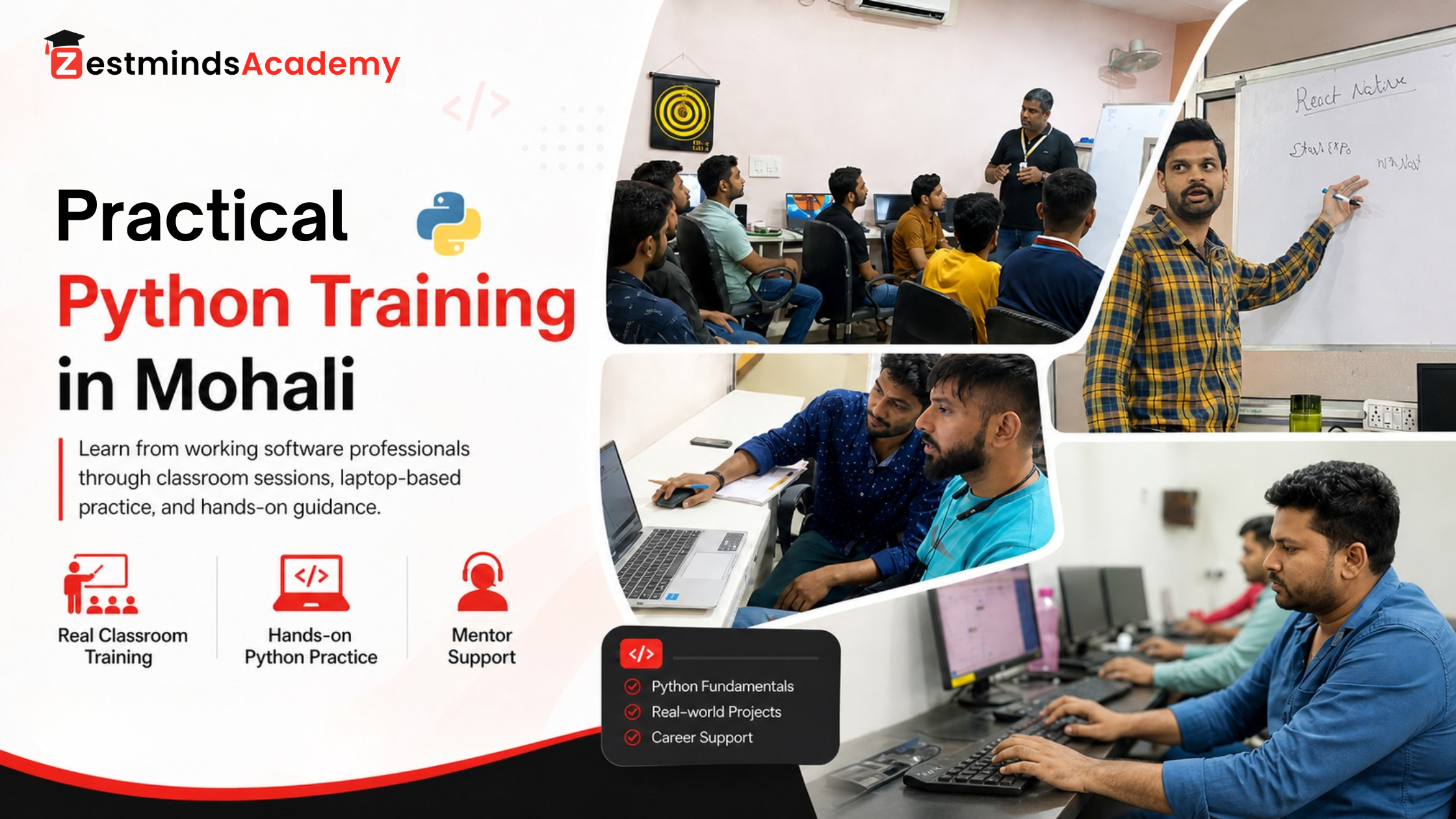
Looking for structured, practical classroom learning? Explore Python Training in Mohali for guided coding assignments, API and database practice, debugging support, and project-style learning.
This practical guide is written for students, freshers, beginners and working professionals who already understand basic Python. It will help you decide:
- Which Python tool matches your learning goal
- What knowledge you need before starting
- What beginner project to build with each tool
- Where learners commonly get stuck
- How several tools can work together in one application
This is not a popularity ranking. These seven tools were selected because together they show how basic Python can grow into a practical application.

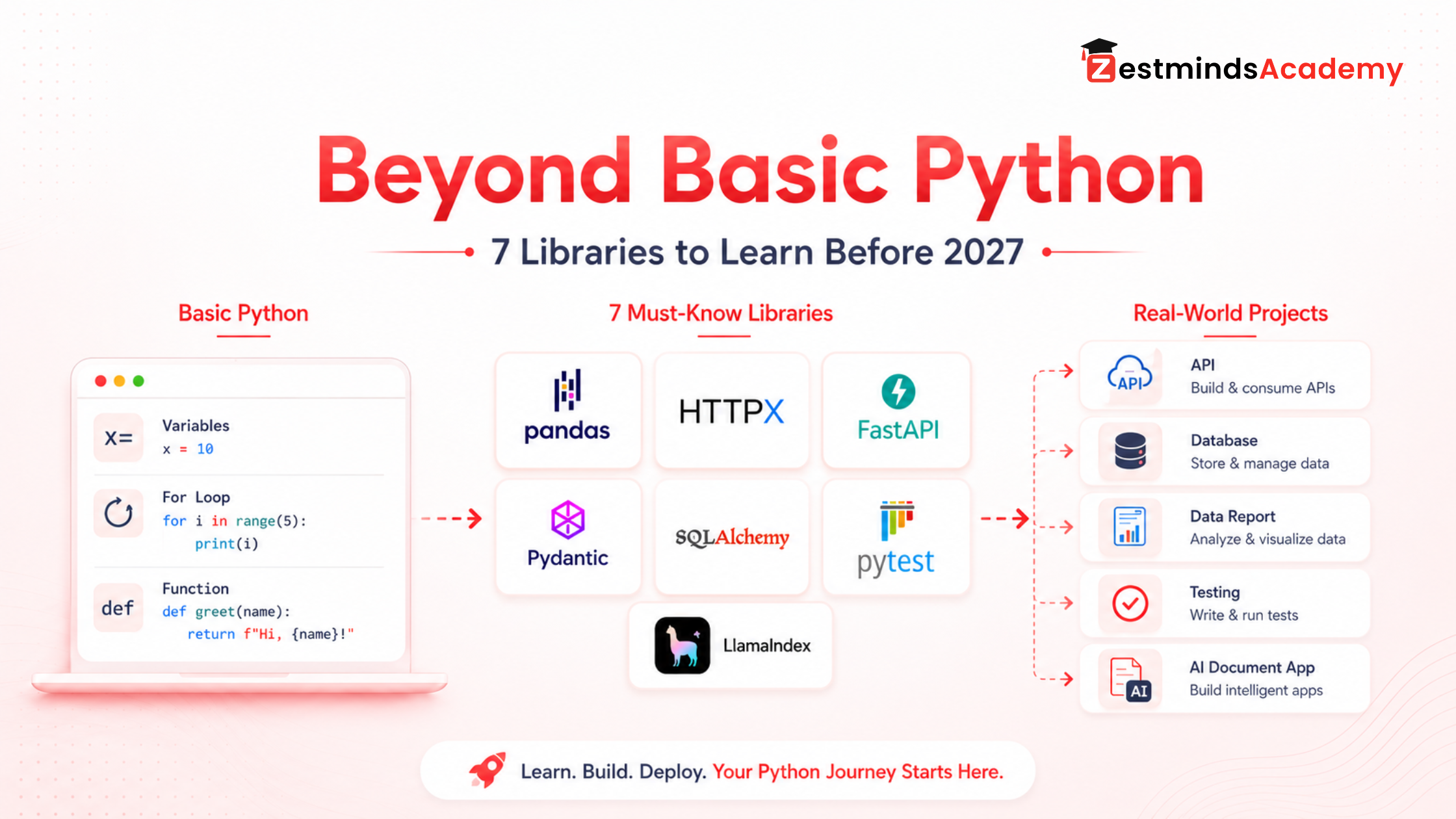
What Should You Learn After Python Basics?
After learning basic syntax, students often make one of two mistakes.
The first is continuing to solve only syntax-based exercises for months. Logic questions are useful, but eventually that logic must be applied to files, APIs, databases and complete features.
The second is jumping directly into advanced AI frameworks or large applications without understanding files, JSON, errors, APIs or project structure.
A more useful transition is:
- Strengthen functions, data structures, file handling, exceptions and basic OOP.
- Learn how to create a project environment and install packafiges safely.
- Choose one direction such as data, APIs, backend development, testing or AI.
- Learn one relevant tool and build one working feature.
- Change the requirement and improve the feature yourself.
- Test the result and document it on GitHub.
- Combine it with another tool only when the first feature works properly.
Mentor Note: Do not measure progress by how many library tutorials you have watched. Measure it by the features you can build, explain, debug and improve without copying every line.
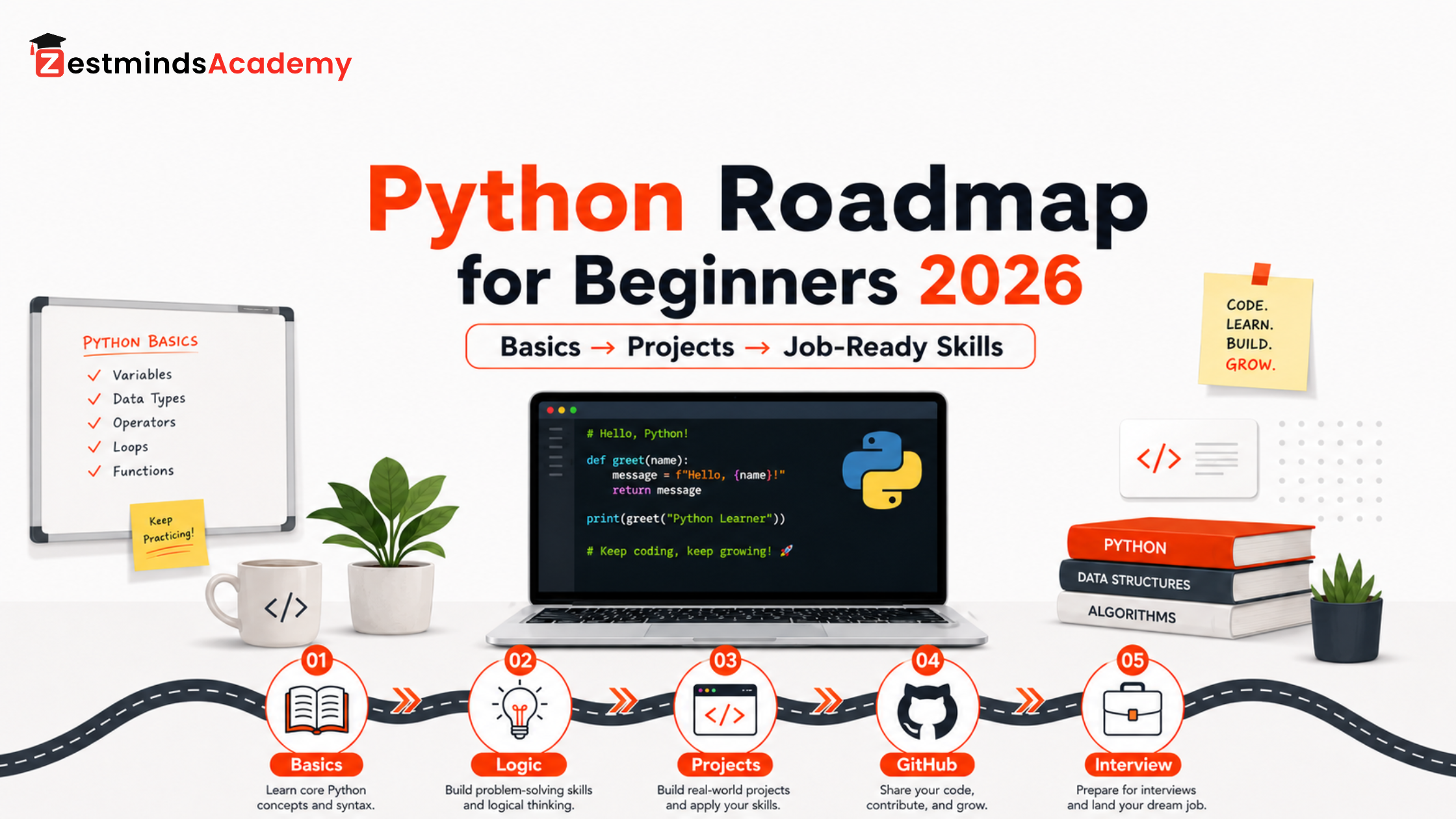
Still learning functions, OOP, files, exceptions, Git or beginner projects? Follow the Python roadmap for beginners before moving deeper into these tools.
Choose the next resource based on your current stage:
- Need a complete learning sequence? Read the Python roadmap for beginners 2026.
- Setting up Python on your laptop? Follow the Python development environment setup guide.
- Know syntax but struggle to build? Learn how to move from core Python syntax to real projects.
- Comparing local training options? Review Python course fees, duration, scope, and projects in Mohali.
Library, Package or Framework: What Is the Difference?
Beginners often use the word “library” for every third-party Python tool. That is understandable, but the terms are slightly different.
| Term | Simple Meaning | Example |
|---|---|---|
| Module | A Python file containing reusable code | helpers.py |
| Package | A structured collection of Python modules | A package installed using pip |
| Library | Reusable functionality that your code calls when needed | pandas or HTTPX |
| Framework | A system that provides the structure and flow of an application or test suite | FastAPI or pytest |
| Toolkit or ORM | Tools for solving a specialised development problem | SQLAlchemy |
In this guide, “Python libraries for beginners” is used as the familiar search phrase, but the list includes libraries, frameworks and development tools.
What Should You Know Before Learning These Python Tools?
You do not need advanced Python mastery, but you should be comfortable with:
- Variables, data types, conditions and loops
- Functions and return values
- Lists and dictionaries
- Basic file reading and writing
- Exception handling with
tryandexcept - Classes and objects at a beginner level
- Importing modules
- Reading simple JSON data
- Using the terminal or command prompt
Before FastAPI, Pydantic and SQLAlchemy, basic OOP and structured dictionary data will be especially useful. Before LlamaIndex, become comfortable with files, APIs, environment variables and debugging first.
If names, values, lists, dictionaries, assignment, or mutable data still feel confusing, first review Python variables and data types with memory thinking. For deeper project behaviour, continue with Python runtime, references, and mutability.
How to Install Python Libraries Safely
Installing every package into the system Python can create dependency conflicts. A better habit is to use a separate virtual environment for each project.
Create a project folder
mkdir python-libraries-practice
cd python-libraries-practice
Create and activate a virtual environment
On Windows:
python -m venv .venv
.venv\Scripts\activate
On macOS or Linux:
python3 -m venv .venv
source .venv/bin/activate
Upgrade pip
python -m pip install --upgrade pipInstall only the tool required for the current project
For a pandas practice project:
pip install pandasFor an API request project:
pip install httpxFor the FastAPI, validation, database and testing project used later in this guide:
pip install fastapi uvicorn "pydantic[email]" sqlalchemy pytestFor a LlamaIndex experiment:
pip install llama-indexAdditional provider packages may be required depending on the language model and embedding provider you select.
Save project dependencies
pip freeze > requirements.txtSomeone reviewing the project can later install the same recorded dependencies with:
pip install -r requirements.txtWhich Python Library Should You Learn First?
Your first tool should depend on what you want to build.
| Your Goal | Start With | First Practical Outcome |
|---|---|---|
| Work with CSV, Excel, reports or datasets | pandas | Clean and export a student report |
| Connect Python with an external service | HTTPX | Fetch and process API data |
| Build backend APIs | FastAPI + Pydantic | Create validated API endpoints |
| Build database-backed applications | SQLAlchemy | Save and retrieve records |
| Improve code reliability | pytest | Test functions and API behaviour |
| Build an application that answers from documents | LlamaIndex after the foundations | Create a basic document question-answering flow |
For many beginners, pandas or HTTPX provides the easiest transition because the output is visible quickly. Backend learners can follow a connected path through FastAPI, Pydantic, SQLAlchemy and pytest.
Quick Comparison: Seven Python Tools and Their Real Use
| Tool | Category | Main Use | Recommended Foundation | Difficulty | First Project |
|---|---|---|---|---|---|
| pandas | Data library | CSV, Excel, cleaning and reports | Lists, dictionaries and files | Beginner | Student marks report |
| HTTPX | HTTP client | API requests and integrations | Functions, JSON and exceptions | Beginner | Public API data fetcher |
| FastAPI | Web framework | Backend APIs | Functions, JSON and basic OOP | Beginner to intermediate | Student management API |
| Pydantic | Validation library | Structured and validated data | Classes, types and dictionaries | Beginner to intermediate | Course registration model |
| SQLAlchemy | SQL toolkit and ORM | Database models and queries | OOP and basic SQL | Intermediate | Course enrolment database |
| pytest | Testing framework | Automated code testing | Functions and expected results | Beginner | Fee calculation tests |
| LlamaIndex | AI application framework | Applications using documents and custom data | Files, APIs and AI basics | Intermediate | Document question-answering app |
Recommended Learning Order for Beginners
If you do not yet have a fixed specialisation, this is a practical default order:
- pandas: Learn how Python handles real tabular data.
- HTTPX: Understand how applications communicate through APIs.
- FastAPI: Build your own API endpoints.
- Pydantic: Validate the information received by your API.
- SQLAlchemy: Store validated information in a database.
- pytest: Test functions, rules and API behaviour.
- LlamaIndex: Explore document-based AI after the application foundation is stable.
This sequence is not compulsory. A data analytics learner may spend more time with pandas before studying NumPy or visualisation. A backend learner may move directly from HTTPX to FastAPI, Pydantic, SQLAlchemy and pytest.
1. pandas for CSV, Excel, Data Cleaning and Reports
Imagine receiving a file containing hundreds of student records. Some rows are duplicated, a few marks are missing, and you need a separate list of students who scored below the passing mark.
You could process every row manually using loops and dictionaries, but the code becomes harder to maintain as the data grows. pandas provides data structures and operations designed for tabular data.
Where pandas is used
- Reading and exporting CSV files
- Working with Excel-style tables
- Cleaning missing or incorrect data
- Filtering records
- Calculating totals, averages and grouped summaries
- Preparing data for charts or dashboards
- Automating recurring reports
Beginner project: student performance report
Create a file called students.csv with columns such as name, email, course and marks. Then:
- Read the CSV file.
- Remove duplicate students.
- Handle missing marks.
- Identify students scoring below 40.
- Export those records to a new file.
import pandas as pd

students = pd.read_csv("students.csv")

students["marks"] = pd.to_numeric(
    students["marks"],
    errors="coerce",
)

students = students.drop_duplicates(subset=["email"])

average_marks = students["marks"].mean()
students["marks"] = students["marks"].fillna(average_marks)

students_needing_support = students[students["marks"] < 40]

students_needing_support.to_csv(
    "students-needing-support.csv",
    index=False,
)

print(students_needing_support[["name", "marks"]])
What this project teaches
- Reading a real file
- Converting values safely
- Removing duplicate data
- Handling missing values
- Filtering rows with a condition
- Exporting a useful result
Common mistake: Do not memorise dozens of pandas methods before building anything. Start with one file and learn only the operations required to clean, filter, summarise and export it.
Students interested in deeper Excel, SQL, Python and dashboard work can also explore practical Data Analytics training in Mohali.
Official reference: pandas getting started documentation.
2. HTTPX for API Requests and Integrations
Modern applications communicate with payment systems, email services, CRMs, maps, AI providers and many other systems. HTTPX helps a Python program send HTTP requests and read the responses returned by an API.
Where HTTPX is used
- Fetching information from an API
- Sending application data to another service
- Connecting payment, email, SMS or CRM systems
- Calling an AI model API
- Testing external service responses
Beginner project: fetch a user from a public demo API
This example uses JSONPlaceholder, a public API created for testing and learning.
import httpx

API_URL = "https://jsonplaceholder.typicode.com/users/1"

try:
    with httpx.Client(timeout=10.0) as client:
        response = client.get(API_URL)
        response.raise_for_status()
        user = response.json()

        print("Name:", user["name"])
        print("Email:", user["email"])
        print("City:", user["address"]["city"])

except (httpx.HTTPError, KeyError, TypeError) as error:
    print("The API request could not be processed:", error)
Expected fields will look similar to:
Name: Leanne Graham
Email: Sincere@april.biz
City: Gwenborough
What this project teaches
- Sending a GET request
- Setting a timeout
- Checking unsuccessful responses
- Reading nested JSON data
- Handling network or data-format errors
Common mistake: Never assume an API always returns valid data. Real integrations must handle timeouts, unsuccessful status codes, missing fields, invalid JSON and authentication failures.
Official reference: HTTPX documentation.
3. FastAPI for Backend API Development
HTTPX helps you consume an API. FastAPI helps you build one.
A backend API receives requests, applies business logic, communicates with databases or external services and returns structured responses. Websites, mobile applications, dashboards and AI interfaces can all communicate with it.
What FastAPI helps beginners understand
- Routes and URL paths
- GET, POST, PUT, PATCH and DELETE requests
- Request and response data
- JSON communication
- Status codes
- Interactive API documentation
- Backend project organisation
Beginner project: student management API
from fastapi import FastAPI

app = FastAPI()

students = [
    {"id": 1, "name": "Aman", "course": "Python"},
    {"id": 2, "name": "Neha", "course": "Data Analytics"},
]


@app.get("/students")
def get_students():
    return {
        "count": len(students),
        "students": students,
    }
Run it with:
uvicorn main:app --reloadOpen http://127.0.0.1:8000/students to view the response and http://127.0.0.1:8000/docs to use FastAPI’s interactive API documentation.
Next features to build
- Add a new student
- View one student by ID
- Update a student
- Delete a student
- Return a clear error when a student does not exist
- Replace the temporary list with a database
Common mistake: A one-file application is acceptable while learning the first route, but do not keep routes, models, database code, services and configuration inside one large main.py as the project grows.
Before expanding the API into multiple modules, understand the difference between Python scripts and structured Python applications.
Official reference: FastAPI documentation.
4. Pydantic for Data Validation and Clean Models
Suppose a registration API expects a name, email, phone number, course and age. Without validation, a user could send an empty name, invalid age or data in the wrong format.
Pydantic lets developers define structured Python models using type hints and validation rules.
Beginner project: course registration model
from pydantic import BaseModel, EmailStr, Field


class CourseRegistration(BaseModel):
    name: str = Field(min_length=2, max_length=80)
    email: EmailStr
    phone: str = Field(min_length=10, max_length=15)
    course_name: str = Field(min_length=2)
    age: int = Field(ge=16, le=70)


registration = CourseRegistration(
    name="Simran",
    email="simran@example.com",
    phone="9876543210",
    course_name="Python",
    age=20,
)

print(registration.model_dump())
The example uses EmailStr, so install the email-validation dependency with:
pip install "pydantic[email]"How Pydantic works with FastAPI
from fastapi import FastAPI

app = FastAPI()


@app.post("/registrations")
def create_registration(registration: CourseRegistration):
    return {
        "message": "Registration received",
        "student": registration,
    }
Common mistake: Data validation does not replace business rules. Pydantic can check the shape and type of the data, but the application must still check whether the course exists, seats are available or the email is already registered.
Official reference: Pydantic model documentation.
5. SQLAlchemy for Database-Backed Applications
Lists and dictionaries are useful for learning, but their contents disappear when the program stops. Real applications need persistent storage.
SQLAlchemy is a Python SQL toolkit and Object Relational Mapper that can map Python classes to relational database tables.
Why basic SQL still matters
- Tables and columns
- Primary and foreign keys
- Relationships
- SELECT, INSERT, UPDATE and DELETE
- Filtering and ordering
- Transactions
- Indexes at a beginner level
Beginner project: save and read student records
from sqlalchemy import create_engine, select
from sqlalchemy.orm import (
    DeclarativeBase,
    Mapped,
    Session,
    mapped_column,
)


class Base(DeclarativeBase):
    pass


class Student(Base):
    __tablename__ = "students"

    id: Mapped[int] = mapped_column(primary_key=True)
    name: Mapped[str]
    course: Mapped[str]


engine = create_engine("sqlite:///academy.db")

Base.metadata.create_all(engine)

with Session(engine) as session:
    session.add(
        Student(
            name="Aman",
            course="Python",
        )
    )
    session.commit()

with Session(engine) as session:
    students = session.scalars(
        select(Student)
    ).all()

    for student in students:
        print(student.id, student.name, student.course)
Expand the project
Create a course-enrolment system with students, courses and enrolments. Add CRUD operations, relationships, duplicate-enrolment prevention, dates and status fields.
Common mistake: Do not treat an ORM as magic. Inspect your tables and practise the equivalent SQL queries so you understand what the application is doing.
Official reference: SQLAlchemy ORM quick start.
6. pytest for Testing Reliable Python Code
Beginners often test a program by running it manually and checking one result. This becomes slow and unreliable as the project grows.
pytest helps you write automated tests that describe how your code is expected to behave.
Beginner project: test a fee discount function
Create fees.py:
def calculate_discount(fee: float, percentage: float) -> float:
    if fee < 0:
        raise ValueError("Fee cannot be negative")

    if percentage < 0 or percentage > 100:
        raise ValueError("Percentage must be between 0 and 100")

    discount = fee * percentage / 100
    return fee - discount
Create test_fees.py:
import pytest

from fees import calculate_discount


def test_ten_percent_discount():
    assert calculate_discount(4000, 10) == 3600


def test_zero_discount():
    assert calculate_discount(4000, 0) == 4000


def test_invalid_percentage():
    with pytest.raises(ValueError):
        calculate_discount(4000, 120)
Run:
pytest -qExpected summary:
3 passedCommon mistake: Do not wait until the whole project is finished. Add tests when an important feature becomes stable so later changes do not silently break it.
Official reference: pytest getting started guide.
7. LlamaIndex for Document-Based AI Applications
AI application development involves more than sending a prompt to a model. A useful document-based application may need to load files, split content, create embeddings, retrieve relevant information and return an answer grounded in the provided data.
LlamaIndex provides tools for applications that work with private or custom information. A common beginner project is a question-answering flow for course notes, policies or manuals.
Beginner project: ask questions from course documents
Create a folder called course_documents and place a supported document inside it.
from llama_index.core import (
    SimpleDirectoryReader,
    VectorStoreIndex,
)

documents = SimpleDirectoryReader(
    "course_documents"
).load_data()

index = VectorStoreIndex.from_documents(documents)
query_engine = index.as_query_engine()

response = query_engine.query(
    "What are the course attendance rules?"
)

print(response)
This example also requires a configured language model and embedding provider. Depending on the provider, you may need an API key or additional integration package.
What a production application needs beyond this example
- Secure file validation
- Careful chunking and metadata
- Persistent storage
- User and document access controls
- Source citations
- Answer-quality evaluation
- Error and cost handling
- Protection from unsafe instructions inside documents
Common mistake: Do not start with LlamaIndex only because AI is popular. Learn files, APIs, environments, debugging and application structure first.
Learners planning to move beyond document search into tool-using AI workflows should first read what Python students should learn before AI agents.
Students who want to explore structured AI application workflows after building a stable Python foundation can review the AI and LLM training program.
Official reference: LlamaIndex VectorStoreIndex documentation.
How These Python Tools Work Together in One Project
These tools should not be treated as seven unrelated subjects. Several can support different parts of the same application.
Consider a course enrolment and student-support application.
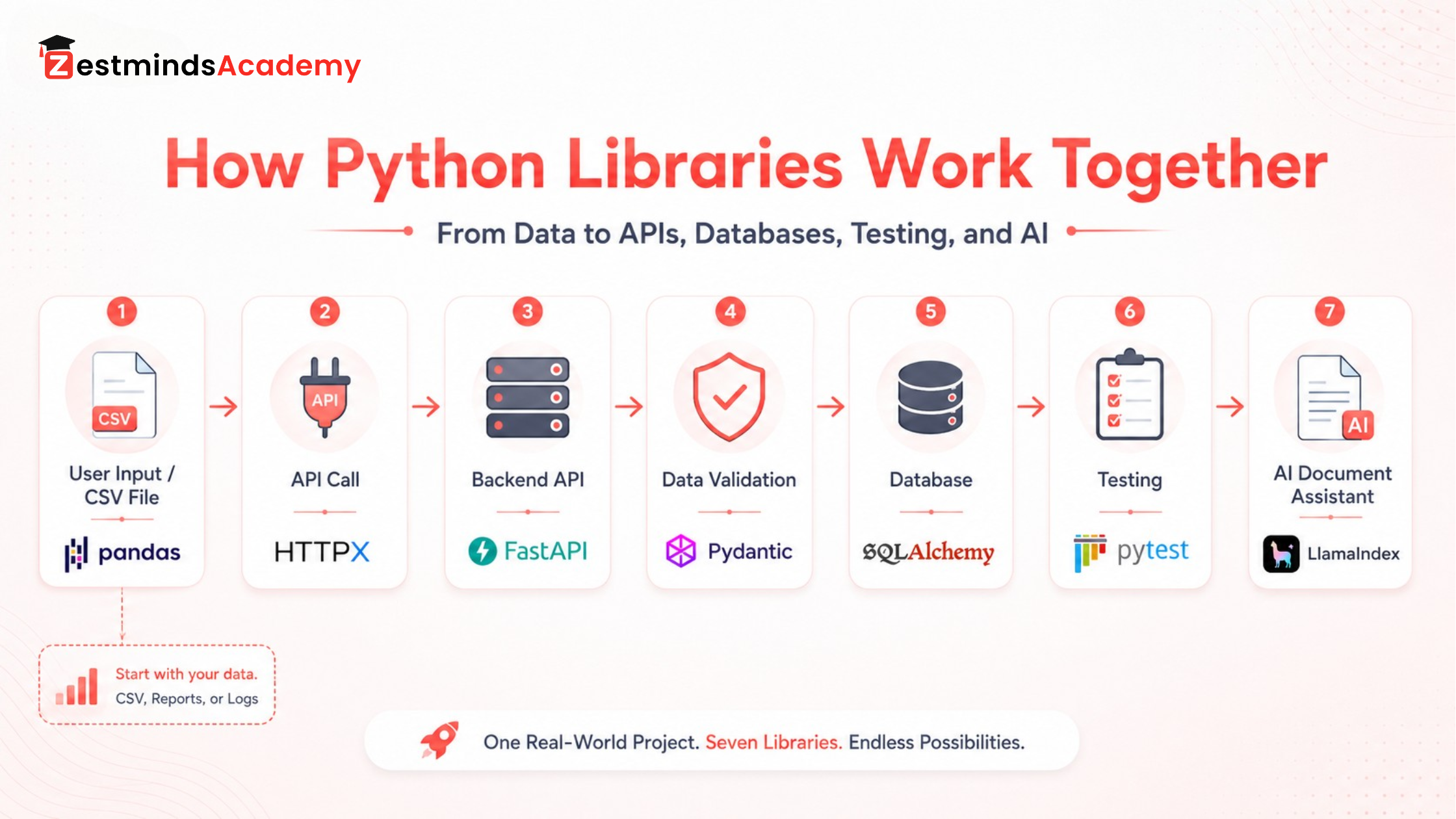
| Project Requirement | Tool | Example Feature |
|---|---|---|
| Import existing student records | pandas | Clean and import a CSV file |
| Expose application features | FastAPI | Create student and course endpoints |
| Validate requests | Pydantic | Check registration fields |
| Store records | SQLAlchemy | Save students, courses and enrolments |
| Connect another service | HTTPX | Call an email or notification API |
| Check important behaviour | pytest | Test registration and enrolment rules |
| Answer from course material | LlamaIndex | Add a document-based course assistant |
Recommended implementation stages
- Build a FastAPI application with one health-check route.
- Create Pydantic request and response models.
- Add students and courses using temporary in-memory lists.
- Replace temporary data with SQLAlchemy and SQLite.
- Add CRUD operations.
- Write pytest tests for important functions and routes.
- Use HTTPX to connect one external service.
- Add a pandas CSV import feature.
- Document installation and usage in GitHub.
- Add the LlamaIndex feature only after the main application works reliably.
What to include in the GitHub README
- Project purpose and main features
- Technology stack
- Installation and environment-variable steps
- How to start the application
- How to run the tests
- API route summary
- Database structure
- Known limitations and future improvements
A guided long-duration project can also be useful during 6 months industrial training in Mohali, where students have more time for project structure, documentation, debugging and feature development.
What About NumPy, Requests, Flask, Django and Scikit-Learn?
These tools were not excluded because they are unimportant. They solve different problems or represent alternative learning paths.
| Tool | When It May Be Useful |
|---|---|
| NumPy | Numerical arrays, mathematical operations and deeper scientific or data work |
| Requests | A widely used synchronous HTTP client with a simple interface |
| Flask | Lightweight web applications where you want more control over structure |
| Django | Full web applications requiring built-in authentication, admin, ORM and project conventions |
| Scikit-learn | Machine learning after data cleaning, feature preparation, evaluation and statistics |
| Matplotlib | Charts and visual explanations of data |
Choose tools based on the project you want to build, not only because another library is popular.
Common Mistakes Students Make While Learning Python Libraries
Learning names instead of solving problems
Knowing that pandas handles data is not enough. Clean a real file. Knowing that FastAPI creates APIs is not enough. Build and test an endpoint.
Copying complete projects without understanding the flow
A copied project may run, but it does not teach why a route exists, where data is validated, how an error is handled or how information reaches the database.
Installing everything globally
Use a virtual environment for each project. This reduces dependency conflicts and makes the project easier to reproduce.
Ignoring failure cases
Files may be missing, APIs may fail, user input may be invalid and database operations may not complete. Include these cases in your assignments.
Avoiding SQL because an ORM is available
SQLAlchemy becomes more useful when you understand relational database concepts and can reason about the queries being executed.
Treating testing as an advanced topic
Begin with one function and two or three test cases. You do not need a complex suite to build the habit of checking behaviour automatically.
Moving to AI before learning application foundations
An AI feature still needs reliable input, storage, APIs, access controls, testing and error handling. Build the application foundation first.
Building projects without documentation
A project is difficult to review when nobody knows how to install, run or understand it. A clear README is part of the project.
A Practical Study Method for Every Python Library
“Practice more” is incomplete advice. Use a repeatable process:
- Define the problem: Write one sentence describing what the tool helps you solve.
- Set up a small project: Create a virtual environment and install only the required packages.
- Type the first example: Read and understand each line instead of pasting blindly.
- Predict the output: Decide what you expect before running the code.
- Change one requirement: Add a field, route, filter or validation rule.
- Break it intentionally: Remove a file, send invalid data or simulate a failed request.
- Read the error: Identify the file, line, exception type and actual cause.
- Add a test: Protect one important behaviour.
- Refactor: Improve names and split oversized functions.
- Document: Write installation steps, features and limitations.
- Explain it: Describe the project without looking at the code.
Practical Check: You understand a library more deeply when you can change the requirement and still complete the feature—not only when you can repeat the original tutorial.
When Mentor-Supported Python Training Can Help
Self-learning can work well when you have a clear roadmap, regular discipline and enough confidence to debug independently.
Structured support may help when you repeatedly face problems such as:
- Not knowing whether your project structure is correct
- Copying code because errors are difficult to understand
- Starting tutorials but completing no project
- Struggling to connect APIs with databases
- Not knowing what should be tested
- Receiving no feedback on assignments
- Being unable to explain your project clearly
At Zestminds Academy, Python learning focuses on practical classroom training, coding assignments, debugging, file handling, APIs, database concepts and project-style exposure with guidance from professionals who work with software-development workflows.
The offline classroom format in Mohali can be useful for students, freshers and working professionals from Mohali, Chandigarh, Kharar, Zirakpur, Panchkula and nearby areas who need regular doubt support and structured practice.
Explore Practical Python Training in Mohali
Final Recommendation: Learn One Tool Through One Complete Feature
You do not need to master seven Python tools together. Choose one direction and complete one working feature:
- Clean a real file with pandas.
- Handle an API response safely with HTTPX.
- Create an endpoint using FastAPI.
- Validate the request with Pydantic.
- Save it through SQLAlchemy.
- Protect its behaviour with pytest.
- Add a document-based AI feature only after the foundation works.
That progression turns Python syntax into practical development ability.
Before choosing a program, you can also compare the Python course fee, duration, scope, and project options in Mohali.
Unsure whether backend development, data analytics, automation or AI suits your current skills? Book a free IT career counselling session to discuss your starting level and learning direction.
Frequently Asked Questions
What should I learn after Python basics?
Strengthen functions, data structures, file handling, exceptions, OOP, pip, virtual environments, Git and small projects. Then choose one direction. Learn pandas for data, HTTPX for integrations, FastAPI and Pydantic for APIs, SQLAlchemy for databases, pytest for testing or LlamaIndex for document-based AI after your foundation is stable.
What is the difference between a Python library and a framework?
A library provides functionality that your code calls when required. A framework provides a broader structure and controls how parts of the application or test flow fit together.
Which Python library should a beginner learn first?
pandas is a practical first choice for files, reports or data. HTTPX is useful for learning API communication. Backend learners can begin FastAPI and Pydantic after becoming comfortable with functions, dictionaries, JSON, exceptions and basic OOP.
Do I need a virtual environment for every Python project?
It is a recommended habit. A virtual environment keeps one project's dependencies separate from other projects and from the system Python installation.
Should beginners learn Requests or HTTPX?
Both are useful. Requests has a familiar synchronous interface. HTTPX supports synchronous and asynchronous APIs and fits well with modern API projects. Focus first on understanding requests, responses, status codes, JSON, timeouts and errors.
Do I need SQL before learning SQLAlchemy?
You can start simple SQLAlchemy examples while learning SQL, but understanding tables, keys, relationships, CRUD operations, joins and transactions will help you use the ORM correctly.
Can FastAPI, Pydantic and SQLAlchemy be used together?
Yes. FastAPI can provide the routes, Pydantic can validate request and response data, and SQLAlchemy can manage database models and operations. pytest can test the application, while HTTPX can support outgoing integrations.
Should a beginner learn LlamaIndex?
A beginner can explore LlamaIndex after becoming comfortable with Python basics, files, APIs, virtual environments, debugging and application structure. It should not normally be the first third-party tool a new Python learner studies.
Table of Contents
- What Should You Learn After Python Basics?
- Library, Package or Framework: What Is the Difference?
- What Should You Know Before Learning These Python Tools?
- How to Install Python Libraries Safely
- Which Python Library Should You Learn First?
- Quick Comparison: Seven Python Tools and Their Real Use
- Recommended Learning Order for Beginners
- pandas for CSV, Excel, Data Cleaning and Reports
- HTTPX for API Requests and Integrations
- FastAPI for Backend API Development
- Pydantic for Data Validation and Clean Models
- SQLAlchemy for Database-Backed Applications
- pytest for Testing Reliable Python Code
- LlamaIndex for Document-Based AI Applications
- How These Python Tools Work Together in One Project
- What About NumPy, Requests, Flask, Django and Scikit-Learn?
- Common Mistakes Students Make While Learning Python Libraries
- A Practical Study Method for Every Python Library
- When Mentor-Supported Python Training Can Help
- Final Recommendation
- Frequently Asked Questions
Rajat Sharma
Stay Ahead with Expert Insights & Trends
Explore industry trends, expert analysis, and actionable strategies to drive success in AI, software development, and digital transformation.
Begin Your Journey to a Successful Tech Career
Talk to our mentors and choose the right training program.
Call us: +91-9056277961
Email us: hello@zestmindsacademy.com